Advance Excel Classes in Belgaon

feature-iconBuild expert-level Excel skills with SevenMentor’s Advanced Excel Course.
feature-iconMaster data analysis, automation, and visualization techniques to enhance efficiency.
feature-iconGain the confidence to tackle complex Excel tasks and advance your career opportunities.

020-71171500

Start Today!

CONSULT WITH
OUR ADVISORS

  • Course & Curriculum Details
  • Flexible Learning Options
  • Affordable Learning
  • Enrollment Process
  • Career Guidance
  • Internship Opportunities
  • General Communication
  • Certification Benefits

Learning Curve for Advanced Excel
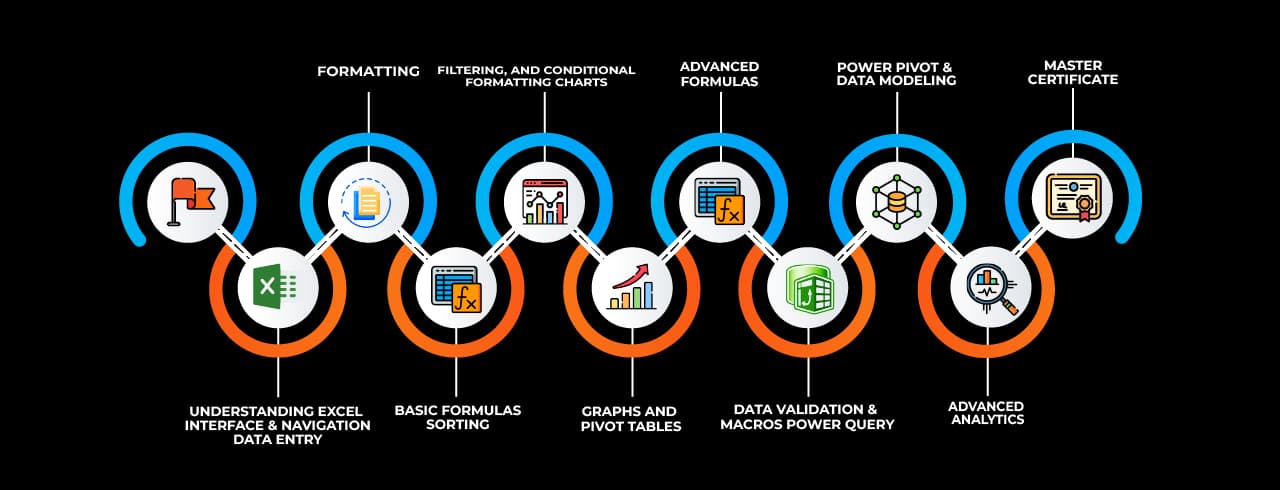
Learning curve for Advanced Excel

Master In Advanced Excel Course

OneCourseMultipleRoles

Empower your career with in-demand data skills and open doors to top-tier opportunities.

Advanced Excel Specialist
Excel Data Analyst
Excel Power User
Excel Consultant
Excel Dashboard Developer
Excel Automation Specialist (VBA)
Excel Reporting Analyst
Excel Trainer
Excel Power BI Integration Specialist
Excel Financial Analyst

Skills & Tools You'll Learn -

Pivot Tables iconPivot TablesSummarize, analyze, and visualize large datasets with interactive tables.
Power Query iconPower QueryAutomate data import, transformation, and cleaning from multiple sources.
Power Pivot  iconPower Pivot Perform advanced data modeling and analysis using DAX formulas.
Data Validation iconData ValidationControl and restrict data entry with rules and dropdown lists.
Conditional Formatting  iconConditional Formatting Highlight data based on conditions using colors, icons, and bars.
Solver  iconSolver Optimize decision-making by finding the best solution for complex problems.
Goal Seek iconGoal SeekAdjust input values to achieve a specific target outcome in formulas.
What-If Analysis iconWhat-If AnalysisSimulate different scenarios by changing input values dynamically.
Macros iconMacrosAutomate repetitive tasks using VBA to enhance productivity.
Data Tables iconData TablesAnalyze multiple outcomes of formulas by varying input values.
Text to Columns  iconText to Columns Split text into separate columns based on delimiters or fixed width.
Flash Fill  iconFlash Fill Automatically recognize and complete patterns in data formatting.
Charts & Graphs  iconCharts & Graphs Visually represent data insights using various chart types.
Remove Duplicates  iconRemove Duplicates Eliminate duplicate records to maintain clean and unique data.
Name Manager iconName ManagerDefine and manage named ranges for easier formula referencing.
Dynamic Arrays iconDynamic ArraysUse formulas that automatically expand to return multiple results.

Why Choose SevenMentor Advanced Excel

Empowering Careers with Industry-Ready Skills.

Specialized Pocket Friendly Programs as per your requirements

Specialized Pocket Friendly Programs as per your requirements

Live Projects With Hands-on Experience

Live Projects With Hands-on Experience

Corporate Soft-skills & Personality Building Sessions

Corporate Soft-skills & Personality Building Sessions

Digital Online, Classroom, Hybrid Batches

Digital Online, Classroom, Hybrid Batches

Interview Calls Assistance & Mock Sessions

Interview Calls Assistance & Mock Sessions

1:1 Mentorship when required

1:1 Mentorship when required

Industry Experienced Trainers

Industry Experienced Trainers

Class Recordings for Missed Classes

Class Recordings for Missed Classes

1 Year FREE Repeat Option

1 Year FREE Repeat Option

Bonus Resources

Bonus Resources

Curriculum For Advanced Excel

BATCH SCHEDULE

Advanced Excel Course

Find Your Perfect Training Session

Jan 4 - Jan 10

2 sessions
04
Sun
Classroom/ Online
Weekend Batch
10
Sat
Classroom/ Online
Weekend Batch

Jan 11 - Jan 17

1 sessions
12
Mon
Classroom/ Online
Regular Batch

Jan 18 - Jan 24

1 sessions
19
Mon
Classroom/ Online
Regular Batch

Learning Comes Alive Through Hands-On PROJECTS!

Comprehensive Training Programs Designed to Elevate Your Career

Sales Performance Dashboard (Excel)

Sales Performance Dashboard (Excel)

Financial Budget & Expense Tracker

Financial Budget & Expense Tracker

Inventory Management System (Excel)

Inventory Management System (Excel)

Employee Attendance & Payroll Report

Employee Attendance & Payroll Report

Customer Data Analysis & Segmentation

Customer Data Analysis & Segmentation

No active project selected.

Transform Your Future with Elite Certification

Add Our Training Certificate In Your LinkedIn ProfileLinkedIn

Our industry-relevant certification equips you with essential skills required to succeed in a highly dynamic job market.

Join us and be part of over 50,000 successful certified graduates.

Student 1
Student 2
Student 3
Student 4
Student 5
Join 15,258 others learning today
Certificate Preview

KEY Features that Makes Us Better and Best FIT For You

Expert Trainers

Industry professionals with extensive experience to guide your learning journey.

Comprehensive Curriculum

In-depth courses designed to meet current industry standards and trends.

Hands-on Training

Real-world projects and practical sessions to enhance learning outcomes.

Flexible Schedules

Options for weekday, weekend, and online batches to suit your convenience.

Industry-Recognized Certifications

Globally accepted credentials to boost your career prospects.

State-of-the-Art Infrastructure

Modern facilities and tools for an engaging learning experience.

100% Placement Assistance

Dedicated support to help you secure your dream job.

Affordable Fees

Quality training at competitive prices with flexible payment options.

Lifetime Access to Learning Materials

Revisit course content anytime for continuous learning.

Personalized Attention

Small batch sizes for individualized mentoring and guidance.

Diverse Course Offerings

A wide range of programs in IT, business, design, and more.

Course Content

About Advanced Excel

One of the most important tools for data analysis, reporting, modelling, and automation is Microsoft Excel, which is used in many different industries. Excel proficiency is now a must for anybody working in the modern office, from accountants and financial analysts to human resource managers and marketers. Learning advanced Excel has become crucial for professionals looking to increase productivity and make data-driven decisions because of the rising expectations for competency with features like Power Query, Pivot Tables, advanced formulae, macros, and VBA scripting. If you are looking to master these skills and become job-ready, Advance Excel classes in Belgaon are your gateway to success.

Belgaon has emerged as a growing center for quality education and vocational training in recent years. As industries around the region continue to digitize and grow, the need for technically skilled professionals is increasing. Organizations are seeking individuals who can extract, analyze, and present data efficiently using Excel’s full range of features. In such a scenario, enrolling in a professional-level training program like the Advance Excel training in Belgaon will not only equip you with deep technical expertise but also make your resume stand out to employers.


Why Learn Advanced Excel?

Even while most people are familiar with Excel's fundamental features, having advanced Excel abilities enables users to handle massive amounts of data, automate tedious operations, produce intelligent dashboards, and construct intricate financial models. Working with features like INDEX-MATCH, array formulas, conditional formatting, Power Pivot, What-If analysis, data validation, slicers, and creating VBA code to develop personalised automation scripts are all part of the advanced skill set.

In addition to being more productive, professionals with these abilities can make strategic contributions to their company. By taking up Advance Excel courses in Belgaon, you will gain mastery over these tools and techniques. The training ensures that learners are ready to take on real-world business challenges that require more than basic spreadsheet knowledge.


Course Structure and Curriculum

The Advance Excel classes in Belgaon offered by top institutes such as SevenMentor – the best training institute for Advance Excel cover a meticulously designed curriculum. The course structure includes in-depth sessions on: Advanced data functions and formulas, Logical and lookup functions, PivotTables and PivotCharts for dynamic reports, Data validation and conditional formatting, Excel dashboards and visualization techniques, Macro recording and editing, Introduction to Visual Basic for Applications (VBA), Automation and custom form creation.

The hands-on training method allows students to apply what they learn in real-time, enhancing both understanding and retention. Excel case studies, business scenarios, and mini-projects are incorporated throughout the course to give students practical insights into the use of Excel in different industries.


Why Choose SevenMentor?

Among the various institutes offering Advance Excel courses in BelgaonSevenMentor – the best training institute for Advance Excel stands out due to its industry-aligned curriculum, experienced trainers, and focus on practical learning. The institute boasts a reputation for delivering high-quality, job-oriented training across technical domains, and its Excel training program is no exception.

The faculty at SevenMentor consists of Excel experts with extensive experience in corporate training and real-world project execution. The teaching methodology combines concept explanation with live demonstrations and real-world exercises. This not only makes the sessions interactive but also ensures practical exposure. The batch sizes are kept small to ensure personalized attention, and students have access to resources like recorded lectures, practice files, and assignment support.


Placement and Certification Support

A significant advantage of enrolling in Advance Excel in Belgaon through SevenMentor is the post-training support offered by the institute. Students receive a recognized certification upon completion of the course, validating their skills to potential employers. The certificate also adds weight to your LinkedIn profile and resume, helping you get noticed in the job market.

Moreover, SevenMentor offers placement assistance through its network of hiring partners. Resume-building sessions, mock interviews, and job alerts are provided to students as part of the training package. Alumni of the Excel course have secured roles such as Data Analyst, MIS Executive, Business Analyst, and Finance Executive in leading companies, thanks to their proficiency in Excel.


Flexible Batch Timings and Training Options

Understanding the busy schedules of students and working professionals, SevenMentor provides flexible training options. Multiple batches are available throughout the week, including weekend and evening classes. The training mode is available in both classroom and online formats, enabling learners to choose the format that suits them best.

The physical training centers are well-equipped with modern computer labs, while the online sessions are conducted using interactive platforms, ensuring the same level of engagement. Learners can also switch between modes if their availability changes during the course duration.


The Growing Demand for Excel Professionals

With the rise of data-driven decision-making, organizations are increasingly relying on tools like Excel for data manipulation, reporting, and analytics. Despite the growth of specialized tools like Power BI and Tableau, Excel remains a foundational tool that complements these platforms.

Professionals skilled in advanced Excel are in high demand across industries like BFSI, healthcare, IT services, logistics, and retail. From managing inventory and analyzing sales trends to forecasting budgets and preparing tax reports, the applications are endless. Employers often look for candidates who can hit the ground running, and the Advance Excel classes in Belgaon prepare you exactly for that.


Real-World Applications of Advanced Excel

One of the best aspects of training at SevenMentor – the best training institute for Advance Excel is its focus on real-world applicability. The trainers guide students through actual business use-cases such as preparing financial statements, sales dashboards, market trend analysis, HR attendance sheets, inventory control reports, and much more.

Students gain knowledge of how to create reliable data models, minimise human error, and optimise business processes. These abilities not only increase productivity in day-to-day tasks but also support data-driven decision-making. Students utilise all they have learnt to solve business challenges in project-based modules, which strengthens their comprehension and self-assurance in using Excel on their own.


Affordable and Value-Driven Training

SevenMentor's Excel training courses are reasonably priced to make them available to a variety of students. The institute is committed to providing value through thorough instruction and ongoing assistance. The course rates are still reasonable even though the staff is excellent and the features are extensive. It is even more affordable for professionals and students alike thanks to a variety of payment options and seasonal discounts.

Additionally, students receive lifetime access to specific resources and discussion boards where they can ask questions, exchange ideas, and keep up with the most recent advancements in data analytics and Excel. This guarantees that learning doesn't stop when the course is over.

With expert instructors, a comprehensive curriculum, and strong post-training support, this course helps learners transition from intermediate to advanced Excel users effectively. Make a smart career move today by enrolling in the Advance Excel courses in Belgaon and stay ahead in today’s competitive job market.


Online Classes

SevenMentor offers robust online Advance Excel training in Belgaon. The online course covers the same exhaustive curriculum delivered through interactive live sessions, practical assignments, downloadable resources, and one-on-one mentorship.

Online learners receive the added advantage of recorded sessions for later review, along with access to the digital learning platform 24/7. The online mode ensures maximum flexibility while maintaining the high-quality standards of classroom teaching. It is ideal for freelancers, full-time employees, and remote learners who wish to enhance their Excel skills without disrupting their daily routine.


Corporate Training 

SevenMentor offers tailored corporate Advance Excel training programs specifically designed to suit corporate needs. The corporate training modules are customized based on employee roles, current skill levels, and industry-specific applications. Whether it's training a team of HR managers on reporting and analytics or teaching the finance department to automate reconciliations using VBA, SevenMentor provides end-to-end solutions. The sessions can be conducted on-site or virtually, ensuring minimal disruption to business operations.

Moreover, the corporate training packages come with pre-assessments, post-training evaluations, and performance reports to measure learning outcomes effectively. Investing in Excel training enhances team efficiency, reduces errors, and ensures better data-driven decision-making across departments.

Frequently Asked Questions

Everything you need to know about our revolutionary job platform

1

What is Excel?

Ans:
Microsoft Excel is a spreadsheet application that allows you to store data in cells. A spreadsheet is a great way to store and organize data.
2

What are pivot tables and how they are used.

Ans:
Excel's pivot tables are strong instruments that let users organize, examine, analyze, and summarize vast volumes of data. By creating customized views by dragging and dropping fields into rows and columns, they allow users to extract valuable information.
3

What is Microsoft Advanced Excel?

Ans:
Microsoft Advanced Excel makes it easier to use high recognition functions and formulas when working with complex datasets. This covers things like conditional formatting, vlookup, vba macros, pivot tables, and consolidation.
4

What are the basic Excel formulas?

Ans:
The basic Excel formulas are- 1. SUM 2. AVERAGE 3. COUNT 4. COUNTA 5. IF 6. TRIM 7. MAX & MIN
5

Who is this course for?

Ans:
This Advanced Excel course is suitable for anyone who wants to learn Excel. No prior knowledge of Excel is required. Whether you are a business professional, student, teacher, freelancer, or solopreneur, this training can benefit you and help you take your Excel skills to the next level. Excel is the most used spreadsheet software across the globe, and is considered essential in many industries like administration, accounting, construction, real estate, sales and marketing to name a few.
6

Do you have other online Excel courses?

Ans:
Yes, we do! Here are the other Excel courses we offer: Basic Excel Advanced Excel Pivot Tables Macros and VBA Dashboards Power Query Power Pivot Power BI
7

What is the difference between Basic Excel and Advanced Excel?

Ans:
Advanced Excel is different from Basic Excel since use has to focus more on DSUM, DCOUNT, Pivot Table, Pivot Chart, Formulas, Functions, and Macros.
8

Is this Advanced Excel Course beneficial?

Ans:
Yes, having strong Excel skills can help you land a good job. Project management, data analysis, and finance are among the industries that require proficiency with Excel. It increases output, streamlines complex processes, and provides access to jobs such as operations manager, finance analyst, and data analyst. Earning potential and employment options may rise with the addition of certifications.
9

What are the prerequisites for this course?

Ans:
There are no prerequisites required to join our Advanced Excel Course. Though basic excel knowledge can be useful. We are also going to cover basic excel before jumping to advanced excel.
10

Who can do this course?

Ans:
The course specifically requires no requisites as we work on students right from beginner levels. Anyone with basic Personal computing expertise can take this course.
11

Are SevenMentor's Advanced Excel trainers certified?

Ans:
Our instructors are certified experts with immense experience of data in the various industries. Our experts will provide you insights into current trends and relevant technologies that will help you get more into practicality of the subject than just theoretical knowledge.
12

What's the fee structure for Advanced Excel Course?

Ans:
Cost varies by course duration and format (online/offline). Contact our counselors for current fees - we offer installment plans making it easy for more students to afford.
13

Will I get a certificate after completing the Advanced Excel course offered by SevenMentor ?

Ans:
Yes! We provide a certificate after successful completion of the course. Our certificate is accredited globally and will add immense value to your skills and resume
14

Will you provide placement?

Ans:
We don’t directly provide placements, though our placement assistance team will conduct mock interviews and assessment. We will help you with updating resumes to help you prepare for job interviews.
15

How to join SevenMentor's Advanced Excel Course?

Ans:
Visit our center or website to schedule a free level-check test. We'll recommend the right batch for you. Limited seats available - book early to secure your spot before intake deadlines.

Explore Other Demanding Courses

No courses available for the selected domain.