Advance Excel Courses in Solapur

feature-iconBuild expert-level Excel skills with SevenMentor’s Advanced Excel Course.
feature-iconMaster data analysis, automation, and visualization techniques to enhance efficiency.
feature-iconGain the confidence to tackle complex Excel tasks and advance your career opportunities.
020-71171500

Start Today!

CONSULT WITH
OUR ADVISORS

  • Course & Curriculum Details
  • Flexible Learning Options
  • Affordable Learning
  • Enrollment Process
  • Career Guidance
  • Internship Opportunities
  • General Communication
  • Certification Benefits

Learning Curve for Advanced Excel
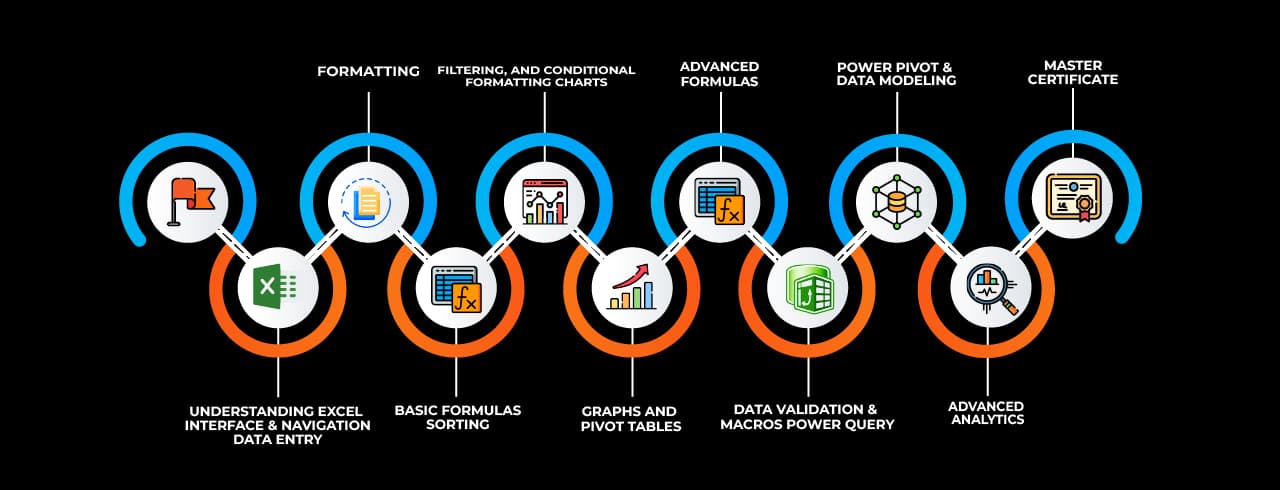
Learning curve for Advanced Excel

Master In Advanced Excel Course

OneCourseMultipleRoles

Empower your career with in-demand data skills and open doors to top-tier opportunities.

Advanced Excel Specialist
Excel Data Analyst
Excel Power User
Excel Consultant
Excel Dashboard Developer
Excel Automation Specialist (VBA)
Excel Reporting Analyst
Excel Trainer
Excel Power BI Integration Specialist
Excel Financial Analyst

Skills & Tools You'll Learn -

Pivot Tables iconPivot TablesSummarize, analyze, and visualize large datasets with interactive tables.
Power Query iconPower QueryAutomate data import, transformation, and cleaning from multiple sources.
Power Pivot  iconPower Pivot Perform advanced data modeling and analysis using DAX formulas.
Data Validation iconData ValidationControl and restrict data entry with rules and dropdown lists.
Conditional Formatting  iconConditional Formatting Highlight data based on conditions using colors, icons, and bars.
Solver  iconSolver Optimize decision-making by finding the best solution for complex problems.
Goal Seek iconGoal SeekAdjust input values to achieve a specific target outcome in formulas.
What-If Analysis iconWhat-If AnalysisSimulate different scenarios by changing input values dynamically.
Macros iconMacrosAutomate repetitive tasks using VBA to enhance productivity.
Data Tables iconData TablesAnalyze multiple outcomes of formulas by varying input values.
Text to Columns  iconText to Columns Split text into separate columns based on delimiters or fixed width.
Flash Fill  iconFlash Fill Automatically recognize and complete patterns in data formatting.
Charts & Graphs  iconCharts & Graphs Visually represent data insights using various chart types.
Remove Duplicates  iconRemove Duplicates Eliminate duplicate records to maintain clean and unique data.
Name Manager iconName ManagerDefine and manage named ranges for easier formula referencing.
Dynamic Arrays iconDynamic ArraysUse formulas that automatically expand to return multiple results.

Why Choose SevenMentor Advanced Excel

Empowering Careers with Industry-Ready Skills.

Specialized Pocket Friendly Programs as per your requirements

Specialized Pocket Friendly Programs as per your requirements

Live Projects With Hands-on Experience

Live Projects With Hands-on Experience

Corporate Soft-skills & Personality Building Sessions

Corporate Soft-skills & Personality Building Sessions

Digital Online, Classroom, Hybrid Batches

Digital Online, Classroom, Hybrid Batches

Interview Calls Assistance & Mock Sessions

Interview Calls Assistance & Mock Sessions

1:1 Mentorship when required

1:1 Mentorship when required

Industry Experienced Trainers

Industry Experienced Trainers

Class Recordings for Missed Classes

Class Recordings for Missed Classes

1 Year FREE Repeat Option

1 Year FREE Repeat Option

Bonus Resources

Bonus Resources

Curriculum For Advanced Excel

BATCH SCHEDULE

Advanced Excel Course

Find Your Perfect Training Session

Dec 28 - Jan 3

2 sessions
28
Sun
Classroom/ Online
Weekend Batch
03
Sat
Classroom/ Online
Weekend Batch

Jan 4 - Jan 10

1 sessions
05
Mon
Classroom/ OnlineToday
Regular Batch

Jan 11 - Jan 17

1 sessions
12
Mon
Classroom/ Online
Regular Batch

Learning Comes Alive Through Hands-On PROJECTS!

Comprehensive Training Programs Designed to Elevate Your Career

Sales Performance Dashboard (Excel)

Sales Performance Dashboard (Excel)

Financial Budget & Expense Tracker

Financial Budget & Expense Tracker

Inventory Management System (Excel)
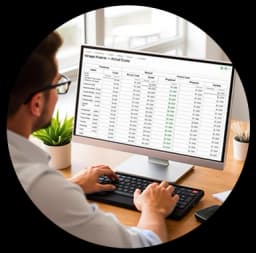
Inventory Management System (Excel)

Employee Attendance & Payroll Report

Employee Attendance & Payroll Report

Customer Data Analysis & Segmentation

Customer Data Analysis & Segmentation

No active project selected.

Transform Your Future with Elite Certification

Add Our Training Certificate In Your LinkedIn ProfileLinkedIn

Our industry-relevant certification equips you with essential skills required to succeed in a highly dynamic job market.

Join us and be part of over 50,000 successful certified graduates.

Student 1
Student 2
Student 3
Student 4
Student 5
Join 15,258 others learning today
Certificate Preview

KEY Features that Makes Us Better and Best FIT For You

Expert Trainers

Industry professionals with extensive experience to guide your learning journey.

Comprehensive Curriculum

In-depth courses designed to meet current industry standards and trends.

Hands-on Training

Real-world projects and practical sessions to enhance learning outcomes.

Flexible Schedules

Options for weekday, weekend, and online batches to suit your convenience.

Industry-Recognized Certifications

Globally accepted credentials to boost your career prospects.

State-of-the-Art Infrastructure

Modern facilities and tools for an engaging learning experience.

100% Placement Assistance

Dedicated support to help you secure your dream job.

Affordable Fees

Quality training at competitive prices with flexible payment options.

Lifetime Access to Learning Materials

Revisit course content anytime for continuous learning.

Personalized Attention

Small batch sizes for individualized mentoring and guidance.

Diverse Course Offerings

A wide range of programs in IT, business, design, and more.

Course Content

About Advanced Excel

Excel is now much more than just a spreadsheet program. These days, it is an effective tool for reporting, automation, data analysis, and decision-making. Professionals with advanced Excel skills are highly sought after in today's business environment. A thorough approach to learning these tools is provided by Advance Excel Classes in Solapur, giving professionals and students a competitive advantage in the employment market. For such top-notch technical training, Solapur, a fast-growing Maharashtra city with a solid industrial and educational foundation, is the perfect place.

Advanced Excel abilities are in high demand across a variety of industries, including supply chain management, marketing, sales, finance, and human resources. Accurately analysing, visualising, and interpreting data is a crucial skill as firms become more and more data-driven. People can bridge the gap between basic Excel competency and expert-level analytics by enrolling in an advanced Excel training program. Learners can improve their productivity and decision-making skills by utilising technologies such as dashboards, VBA macros, pivot tables, sophisticated calculations, and data validation.

Choosing the right training institute is essential to gain this expertise. SevenMentor, the best training institute for Advance Excel, provides a curriculum designed by industry experts that aligns with real-world applications. Their training methodology, experienced faculty, and focus on hands-on projects ensure that students receive both theoretical knowledge and practical skills. Whether you are a student looking to improve your employability or a working professional aiming to boost your productivity, these courses serve a wide range of learning needs.


Curriculum Overview of Advance Excel Training

The curriculum of Advance Excel training in Solapur at SevenMentor is structured to gradually build up skills from intermediate to advanced levels. It starts with a recap of essential Excel functions and moves into complex formulas, logical and statistical functions, data visualization techniques, automation using VBA, and real-world business analytics. One of the significant advantages of this training is the use of live data and business cases that allow learners to understand how Excel is used to solve daily business problems.

Topics like nested IF statements, LOOKUP functions, INDEX-MATCH, data validation, conditional formatting, and dynamic chart creation are thoroughly covered. Students also learn to design interactive dashboards and automate repetitive tasks using Excel macros and VBA scripting. These skills are crucial for professionals who manage data-heavy tasks and want to improve operational efficiency.

SevenMentor ensures that all learners work on live projects, which simulate actual work scenarios. These projects help learners build confidence and familiarity with industry-relevant challenges. The combination of conceptual clarity and practical implementation makes the training highly effective and job-oriented.


Why Solapur is Ideal for Excel Training

Solapur is emerging as an educational hub in Maharashtra. With its growing population of students and professionals, the city has seen a surge in demand for skill-based training programs. Many businesses in Solapur, ranging from textile industries to manufacturing units, require employees who are proficient in Excel for inventory tracking, cost analysis, reporting, and more. This need has created a solid base for Advance Excel courses in Solapur to flourish and attract participants from diverse domains.

Furthermore, Solapur is a great place to pursue career-oriented training due to its comparatively low cost of living and growing number of IT companies. Students and recent graduates who wish to add a skill that is generally valued across career roles to their résumé will particularly benefit from it. Weekend and evening sessions that work with their schedules are especially advantageous to professionals who work in neighbouring areas.


Expert Training by Industry Professionals

What sets SevenMentor apart is their faculty. The trainers are certified professionals with years of experience in using Excel for real-time business needs. Their teaching style is interactive and learner-focused. Rather than just delivering lectures, trainers use real-time case studies and datasets to explain complex concepts. This approach allows students to understand not just how to use Excel tools but also when and why to use them.

Trainers assist students create neat and effective workbooks by advising them on best practices and typical pitfalls in data handling. Methods for addressing errors, automating processes, and consolidating data are discussed from the perspective of a practitioner. Additionally, the trainers make sure that every student receives tailored feedback and assistance, which enhances the effectiveness and engagement of the learning process.


Certification and Placement Support

One of the significant advantages of enrolling in Advance Excel training in Solapur through SevenMentor is the certification and career support. Upon successful completion of the course, learners receive a recognized certification that validates their skills and boosts their professional credibility. This certification is widely accepted by employers and gives candidates an advantage in interviews and promotions.

Additionally, SevenMentor provides career counselling and placement support. They assist students with employment referrals, resume construction, and practice interviews. SevenMentor makes sure that students not only learn but also find opportunities to put their knowledge to use through industry collaborations and a robust network in corporate hiring. Numerous students who successfully finished their training have found employment in reputable companies both inside and outside of Solapur.


Applications of Advanced Excel Across Industries

The skills acquired through Advance Excel classes in Solapur are applicable across a variety of domains. In finance, professionals use Excel for financial modeling, budgeting, and variance analysis. In sales and marketing, it helps in customer segmentation, campaign tracking, and forecasting. HR professionals use Excel to manage employee databases, generate reports, and conduct payroll analysis. Manufacturing and logistics teams use Excel for inventory management, cost tracking, and vendor analysis.

Advanced Excel is also widely used in research and data analysis roles. With features like Power Query and data connections, Excel serves as a powerful tool for data cleansing and consolidation. The addition of VBA scripting makes Excel a platform where automated reports and tools can be developed without requiring separate software.


Hands-On Practice and Assignments

The learning process at SevenMentor is highly interactive and application-based. After every topic, students are given assignments and mini-projects to reinforce learning. These tasks mimic real-world business problems and encourage critical thinking. Students are also encouraged to bring their work-related challenges to the classroom for discussion and resolution.

These hands-on exercises make sure that the learning is retained for long-term use. It transforms learners from passive users to power users who can explore Excel's full potential. The feedback mechanism also plays a vital role in helping learners identify and improve upon weak areas.


Flexible Timings and Course Delivery

SevenMentor provides flexible class schedules since they recognise that students have a variety of demands. There will be a batch that works for you, whether you are a working professional with a set schedule or a college student attending lectures during the day. In order to facilitate better interaction with the trainer, the class size is kept small, and both weekday and weekend batches are available.

The newest equipment and software are installed in the classrooms to ensure a seamless learning environment. SevenMentor also enables students to attend a combination of in-person and virtual sessions according to their convenience for individuals who favour a hybrid learning paradigm. 


Affordable Fees and Value for Money

Excel training is an investment in your career, and SevenMentor ensures that it remains accessible to all. Their pricing is reasonable and offers excellent value for money. Considering the quality of training, the experience of the trainers, and the practical exposure provided, the course fee is well-justified. Moreover, the institute often provides offers and discounts to students and early enrollees, making it even more affordable.

The course structure is transparent, with no hidden costs. All course materials, software access, and support services are included in the package. Students can also revisit missed sessions or clarify doubts at no additional cost.

In today’s data-centric world, Excel proficiency is no longer optional — it's essential. Whether you're looking to secure a job, get promoted, or increase your day-to-day efficiency, advanced Excel skills can make a significant impact. Advance Excel classes in Solapur serve as a powerful stepping-stone for anyone who wants to excel in their career by mastering one of the most widely used tools in the professional world.


Online Classes

SevenMentor offers comprehensive online Advance Excel training. This option replicates the classroom experience through live virtual sessions, recorded lectures, and interactive assignments. The online course follows the same syllabus as the classroom version and includes all the hands-on training, projects, and certification benefits.

The online mode is especially beneficial for working professionals, homemakers, and students living in remote areas. It allows learners to progress at their own pace and revisit concepts as needed. Trainers are available for doubt resolution through dedicated support channels, ensuring that learners get the same level of interaction and guidance as in-person students.


Corporate Training

SevenMentor also specializes in corporate Advance Excel training programs tailored to organizational needs. These sessions are customized based on the nature of business, skill levels of employees, and specific use-cases. Conducted at client locations or online, the corporate training model ensures minimal disruption to business operations while maximizing employee productivity.

Organizations in Solapur have increasingly opted for Excel training to enhance their workforce’s analytical capabilities. This training helps departments like finance, operations, procurement, and sales to manage data more effectively, build reports, and make informed decisions. The corporate version of Advance Excel training in Solapur includes case studies relevant to the client’s industry, making the learning experience more contextual and applicable.

Frequently Asked Questions

Everything you need to know about our revolutionary job platform

1

What is Excel?

Ans:
Microsoft Excel is a spreadsheet application that allows you to store data in cells. A spreadsheet is a great way to store and organize data.
2

What are pivot tables and how they are used.

Ans:
Excel's pivot tables are strong instruments that let users organize, examine, analyze, and summarize vast volumes of data. By creating customized views by dragging and dropping fields into rows and columns, they allow users to extract valuable information.
3

What is Microsoft Advanced Excel?

Ans:
Microsoft Advanced Excel makes it easier to use high recognition functions and formulas when working with complex datasets. This covers things like conditional formatting, vlookup, vba macros, pivot tables, and consolidation.
4

What are the basic Excel formulas?

Ans:
The basic Excel formulas are- 1. SUM 2. AVERAGE 3. COUNT 4. COUNTA 5. IF 6. TRIM 7. MAX & MIN
5

Who is this course for?

Ans:
This Advanced Excel course is suitable for anyone who wants to learn Excel. No prior knowledge of Excel is required. Whether you are a business professional, student, teacher, freelancer, or solopreneur, this training can benefit you and help you take your Excel skills to the next level. Excel is the most used spreadsheet software across the globe, and is considered essential in many industries like administration, accounting, construction, real estate, sales and marketing to name a few.
6

Do you have other online Excel courses?

Ans:
Yes, we do! Here are the other Excel courses we offer: Basic Excel Advanced Excel Pivot Tables Macros and VBA Dashboards Power Query Power Pivot Power BI
7

What is the difference between Basic Excel and Advanced Excel?

Ans:
Advanced Excel is different from Basic Excel since use has to focus more on DSUM, DCOUNT, Pivot Table, Pivot Chart, Formulas, Functions, and Macros.
8

Is this Advanced Excel Course beneficial?

Ans:
Yes, having strong Excel skills can help you land a good job. Project management, data analysis, and finance are among the industries that require proficiency with Excel. It increases output, streamlines complex processes, and provides access to jobs such as operations manager, finance analyst, and data analyst. Earning potential and employment options may rise with the addition of certifications.
9

What are the prerequisites for this course?

Ans:
There are no prerequisites required to join our Advanced Excel Course. Though basic excel knowledge can be useful. We are also going to cover basic excel before jumping to advanced excel.
10

Who can do this course?

Ans:
The course specifically requires no requisites as we work on students right from beginner levels. Anyone with basic Personal computing expertise can take this course.
11

Are SevenMentor's Advanced Excel trainers certified?

Ans:
Our instructors are certified experts with immense experience of data in the various industries. Our experts will provide you insights into current trends and relevant technologies that will help you get more into practicality of the subject than just theoretical knowledge.
12

What's the fee structure for Advanced Excel Course?

Ans:
Cost varies by course duration and format (online/offline). Contact our counselors for current fees - we offer installment plans making it easy for more students to afford.
13

Will I get a certificate after completing the Advanced Excel course offered by SevenMentor ?

Ans:
Yes! We provide a certificate after successful completion of the course. Our certificate is accredited globally and will add immense value to your skills and resume
14

Will you provide placement?

Ans:
We don’t directly provide placements, though our placement assistance team will conduct mock interviews and assessment. We will help you with updating resumes to help you prepare for job interviews.
15

How to join SevenMentor's Advanced Excel Course?

Ans:
Visit our center or website to schedule a free level-check test. We'll recommend the right batch for you. Limited seats available - book early to secure your spot before intake deadlines.

Explore Other Demanding Courses

No courses available for the selected domain.