Advance Excel Training in Sambhajinagar

feature-iconBuild expert-level Excel skills with SevenMentor’s Advanced Excel Course.
feature-iconMaster data analysis, automation, and visualization techniques to enhance efficiency.
feature-iconGain the confidence to tackle complex Excel tasks and advance your career opportunities.

020-71171500

Start Today!

CONSULT WITH
OUR ADVISORS

  • Course & Curriculum Details
  • Flexible Learning Options
  • Affordable Learning
  • Enrollment Process
  • Career Guidance
  • Internship Opportunities
  • General Communication
  • Certification Benefits

Learning Curve for Advanced Excel
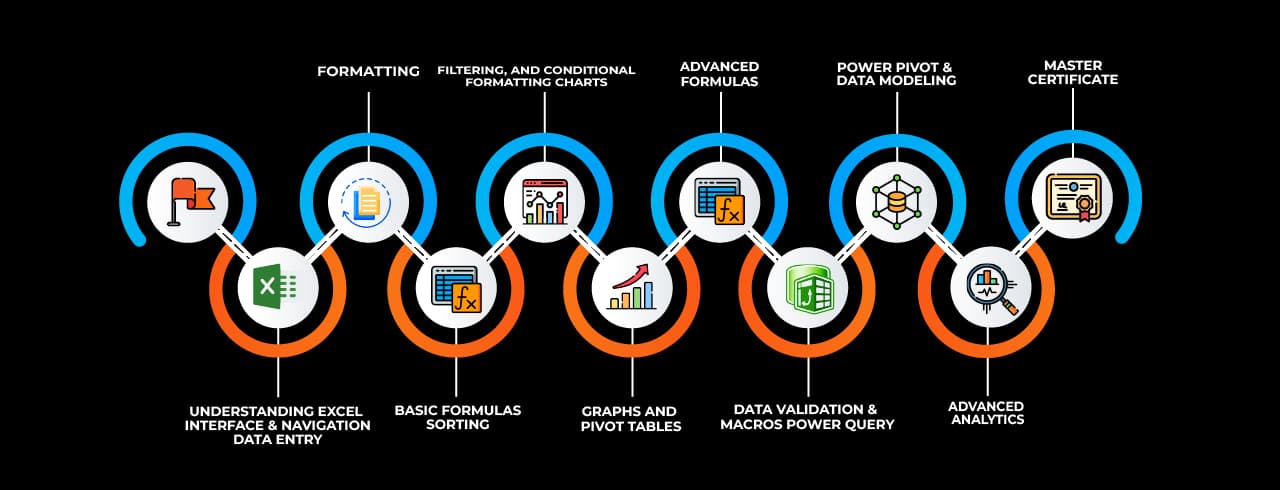
Learning curve for Advanced Excel

Master In Advanced Excel Course

OneCourseMultipleRoles

Empower your career with in-demand data skills and open doors to top-tier opportunities.

Advanced Excel Specialist
Excel Data Analyst
Excel Power User
Excel Consultant
Excel Dashboard Developer
Excel Automation Specialist (VBA)
Excel Reporting Analyst
Excel Trainer
Excel Power BI Integration Specialist
Excel Financial Analyst

Skills & Tools You'll Learn -

Pivot Tables iconPivot TablesSummarize, analyze, and visualize large datasets with interactive tables.
Power Query iconPower QueryAutomate data import, transformation, and cleaning from multiple sources.
Power Pivot  iconPower Pivot Perform advanced data modeling and analysis using DAX formulas.
Data Validation iconData ValidationControl and restrict data entry with rules and dropdown lists.
Conditional Formatting  iconConditional Formatting Highlight data based on conditions using colors, icons, and bars.
Solver  iconSolver Optimize decision-making by finding the best solution for complex problems.
Goal Seek iconGoal SeekAdjust input values to achieve a specific target outcome in formulas.
What-If Analysis iconWhat-If AnalysisSimulate different scenarios by changing input values dynamically.
Macros iconMacrosAutomate repetitive tasks using VBA to enhance productivity.
Data Tables iconData TablesAnalyze multiple outcomes of formulas by varying input values.
Text to Columns  iconText to Columns Split text into separate columns based on delimiters or fixed width.
Flash Fill  iconFlash Fill Automatically recognize and complete patterns in data formatting.
Charts & Graphs  iconCharts & Graphs Visually represent data insights using various chart types.
Remove Duplicates  iconRemove Duplicates Eliminate duplicate records to maintain clean and unique data.
Name Manager iconName ManagerDefine and manage named ranges for easier formula referencing.
Dynamic Arrays iconDynamic ArraysUse formulas that automatically expand to return multiple results.

Why Choose SevenMentor Advanced Excel

Empowering Careers with Industry-Ready Skills.

Specialized Pocket Friendly Programs as per your requirements

Specialized Pocket Friendly Programs as per your requirements

Live Projects With Hands-on Experience

Live Projects With Hands-on Experience

Corporate Soft-skills & Personality Building Sessions

Corporate Soft-skills & Personality Building Sessions

Digital Online, Classroom, Hybrid Batches

Digital Online, Classroom, Hybrid Batches

Interview Calls Assistance & Mock Sessions

Interview Calls Assistance & Mock Sessions

1:1 Mentorship when required

1:1 Mentorship when required

Industry Experienced Trainers

Industry Experienced Trainers

Class Recordings for Missed Classes

Class Recordings for Missed Classes

1 Year FREE Repeat Option

1 Year FREE Repeat Option

Bonus Resources

Bonus Resources

Curriculum For Advanced Excel

BATCH SCHEDULE

Advanced Excel Course

Find Your Perfect Training Session

Dec 28 - Jan 3

2 sessions
28
Sun
Classroom/ Online
Weekend Batch
03
Sat
Classroom/ Online
Weekend Batch

Jan 4 - Jan 10

1 sessions
05
Mon
Classroom/ OnlineToday
Regular Batch

Jan 11 - Jan 17

1 sessions
12
Mon
Classroom/ Online
Regular Batch

Learning Comes Alive Through Hands-On PROJECTS!

Comprehensive Training Programs Designed to Elevate Your Career

Sales Performance Dashboard (Excel)

Sales Performance Dashboard (Excel)

Financial Budget & Expense Tracker

Financial Budget & Expense Tracker

Inventory Management System (Excel)
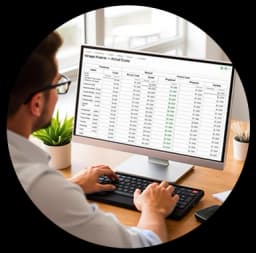
Inventory Management System (Excel)

Employee Attendance & Payroll Report

Employee Attendance & Payroll Report

Customer Data Analysis & Segmentation

Customer Data Analysis & Segmentation

No active project selected.

Transform Your Future with Elite Certification

Add Our Training Certificate In Your LinkedIn ProfileLinkedIn

Our industry-relevant certification equips you with essential skills required to succeed in a highly dynamic job market.

Join us and be part of over 50,000 successful certified graduates.

Student 1
Student 2
Student 3
Student 4
Student 5
Join 15,258 others learning today
Certificate Preview

KEY Features that Makes Us Better and Best FIT For You

Expert Trainers

Industry professionals with extensive experience to guide your learning journey.

Comprehensive Curriculum

In-depth courses designed to meet current industry standards and trends.

Hands-on Training

Real-world projects and practical sessions to enhance learning outcomes.

Flexible Schedules

Options for weekday, weekend, and online batches to suit your convenience.

Industry-Recognized Certifications

Globally accepted credentials to boost your career prospects.

State-of-the-Art Infrastructure

Modern facilities and tools for an engaging learning experience.

100% Placement Assistance

Dedicated support to help you secure your dream job.

Affordable Fees

Quality training at competitive prices with flexible payment options.

Lifetime Access to Learning Materials

Revisit course content anytime for continuous learning.

Personalized Attention

Small batch sizes for individualized mentoring and guidance.

Diverse Course Offerings

A wide range of programs in IT, business, design, and more.

Course Content

About Advanced Excel

From a simple spreadsheet application, Microsoft Excel has developed into a powerful tool for data analysis and corporate information. Professionals may automate tedious activities, create informative reports, and make data-driven decisions by becoming proficient with Excel's advanced capabilities. The goal of Advance Excel classes in Sambhajinagar is to give students these advanced skills so they can succeed in a data-driven work environment.

Sambhajinagar, a growing commercial and industrial hub, is experiencing increasing demand for skilled professionals who can manage, analyze, and interpret data effectively. Organizations are turning towards employees proficient in Excel for tasks such as dashboard creation, data modeling, and macro automation. As a result, upskilling through Advance Excel training in Sambhajinagar has become not just an option, but a necessity for aspiring data professionals, analysts, accountants, and managers.


Understanding the Scope of Advance Excel

Advanced Excel extends beyond basic functions and charts. It encompasses a range of powerful tools including Power Query, Power Pivot, advanced formulas, data visualization techniques, pivot tables, and VBA (Visual Basic for Applications). These tools are critical for extracting meaningful insights from large datasets and improving operational efficiency.

Learners in Advance Excel courses in Sambhajinagar get hands-on experience in dynamic array functions like FILTER, SORT, and UNIQUE, which significantly reduce formula complexity. They also explore advanced lookup techniques such as INDEX-MATCH combinations and XLOOKUP, which provide flexible data referencing options over traditional methods. Moreover, participants are trained in creating interactive dashboards using form controls, slicers, and conditional formatting, which are essential for real-time business reporting.


Industry-Relevant Curriculum and Practical Approach

The curriculum of Advance Excel classes in Sambhajinagar is structured to reflect real-world applications across various domains such as finance, marketing, supply chain, HR, and operations. Each module is enriched with case studies and project-based assessments to ensure learners apply theoretical knowledge in practical contexts. For instance, financial analysts are taught how to perform sensitivity analysis and scenario planning, while marketing professionals gain insights into sales trend analysis using time-series functions.

Excel's Data Analysis ToolPak, solver, and goal-seek features are all used during the training. These tools are essential for forecasting, optimisation models, and regression analysis. In order to extract data directly from databases or internet sources, participants also learn how to manage external data connections and write organised queries.


Excel Automation and VBA Integration

Automation is a key component of advanced Excel functionality. Macros and VBA scripting allow users to automate complex or repetitive tasks with a single click, saving significant time and reducing human errors. In Advance Excel training in Sambhajinagar, participants learn to record, edit, and write VBA codes to build customized functions, automate data entry, and create interactive user forms.

Learners are trained in error handling, looping structures, and worksheet events that help them build resilient macro-enabled workbooks. From generating automated reports to managing inventory data dynamically, VBA integration greatly enhances productivity and accuracy.


Data Cleaning and Power Query

One of the most time-consuming tasks in data analysis is cleaning and transforming raw data. Power Query simplifies this process by enabling users to load, combine, and reshape data with ease. In Advance Excel courses in Sambhajinagar, students explore the Power Query Editor and learn to perform complex data manipulations using M language-based transformations.

Systematically taught tasks include deleting duplicates, combining datasets, unpivoting columns, and using conditional logic. Working with various data sources and getting data ready for additional analysis in pivot tables or power pivot models require this skills.


Power Pivot and Data Modeling

Excel gains data modelling capabilities from Power Pivot, which enables the building of calculated fields using DAX (Data Analysis Expressions) and the establishment of links between sizable datasets. As a result, users may create reliable BI solutions in Excel without relying on third-party applications.

Participants in Advance Excel training in Sambhajinagar master the creation of data models, the application of measures and KPIs, and the use of advanced DAX functions for aggregations and time intelligence. By leveraging these skills, professionals can analyze millions of rows of data efficiently and develop comprehensive business dashboards that provide instant insights.


Dashboard Design and Data Visualization

Data visualization is key to communicating insights effectively. Advanced Excel training focuses on building dynamic dashboards that combine charts, tables, slicers, and interactive elements into a single interface. Learners understand how to design visually appealing and functional dashboards that cater to business requirements.

Topics covered include the use of combo charts, waterfall charts, sparklines, and conditional formatting rules that highlight trends and anomalies. Advance Excel classes in Sambhajinagar ensure that learners are proficient in designing dashboards that are not only informative but also intuitive and user-friendly.


Real-Time Applications and Capstone Projects

The focus on project-based learning at SevenMentor is a characteristic that sets effective training apart. Capstone projects that mimic actual business situations are completed by students. These projects could entail creating a comprehensive sales dashboard, automating month-end financial reporting, or employing sophisticated filters and pivot charts to analyse consumer behaviour trends.

This approach ensures that participants can directly apply their Excel skills in their job roles, thereby adding measurable value to their organizations. Graduates from Advance Excel courses in Sambhajinagar often report significant improvement in their workplace efficiency and decision-making capabilities.


About SevenMentor

SevenMentor the best training institute for Advance Excel offers exceptional learning opportunities in Sambhajinagar. The institute provides expert-led sessions, interactive assignments, and placement assistance, making it a preferred choice among working professionals and fresh graduates alike.

The faculty at SevenMentor comprises industry veterans who bring real-world experience and mentorship into the classroom. The learning environment encourages interactive discussions, peer collaboration, and continuous assessment to ensure holistic development. Whether the goal is to upskill for a promotion or to gain a competitive edge in job interviews, SevenMentor offers a clear pathway to Excel mastery.


Certification and Career Advancement

Upon successful completion of the training program, participants receive a professional certification that validates their expertise in advanced Excel skills. This certification is recognized by employers and can significantly enhance the learner's resume. It serves as a testament to the individual’s ability to handle complex datasets, build automated systems, and provide actionable insights.

Professionals trained through Advance Excel classes in Sambhajinagar have moved into roles such as business analysts, MIS executives, data managers, and financial planners. With the growing reliance on data-driven operations, the career prospects for Excel experts are expanding across all industries.


Why Choose Training in Sambhajinagar?

Sambhajinagar is not only a regional educational hub but also a growing base for businesses and startups. The city’s infrastructure supports a vibrant learning environment, and its accessibility makes it an ideal location for in-person training programs. The availability of qualified trainers, state-of-the-art facilities, and industry linkages enhances the value of pursuing Advance Excel in Sambhajinagar.

Whether you are a student, job seeker, or a corporate employee looking to streamline reporting processes, Sambhajinagar offers the right ecosystem to build your skills. The affordability and availability of training options make it a strategic choice for career advancement.

Advanced Excel is more than just a spreadsheet tool; it's a platform for automation, business intelligence, and decision support. Training in this domain equips learners with a suite of technical competencies that are highly valued across sectors. From data transformation to automation and visualization, the skills taught in Advance Excel courses in Sambhajinagar prepare learners to meet the analytical challenges of modern businesses.


Online Classes

SevenMentor also offers online Advance Excel classes in Sambhajinagar which provides a fully interactive and comprehensive learning experience.

Live instructor-led classes, recorded video modules, downloadable study materials, and online assessments allow learners to progress at their own pace while still engaging with peers and mentors. These sessions are delivered through state-of-the-art learning management systems and include Q&A forums, project submission platforms, and mock interviews.


Corporate Training 

SevenMentor offers tailor-made corporate Advance Excel training that focuses on solving specific business challenges through Excel. Whether it's building automated MIS reports, optimizing supply chain data analysis, or improving financial forecasting accuracy, the training is adapted to real business use cases.

These sessions can be delivered on-site at the client location or virtually, depending on the organization’s preferences. Corporate clients benefit from team-based projects, performance evaluations, and post-training support, ensuring that the skills learned are integrated into everyday operations.

Frequently Asked Questions

Everything you need to know about our revolutionary job platform

1

What is Excel?

Ans:
Microsoft Excel is a spreadsheet application that allows you to store data in cells. A spreadsheet is a great way to store and organize data.
2

What are pivot tables and how they are used.

Ans:
Excel's pivot tables are strong instruments that let users organize, examine, analyze, and summarize vast volumes of data. By creating customized views by dragging and dropping fields into rows and columns, they allow users to extract valuable information.
3

What is Microsoft Advanced Excel?

Ans:
Microsoft Advanced Excel makes it easier to use high recognition functions and formulas when working with complex datasets. This covers things like conditional formatting, vlookup, vba macros, pivot tables, and consolidation.
4

What are the basic Excel formulas?

Ans:
The basic Excel formulas are- 1. SUM 2. AVERAGE 3. COUNT 4. COUNTA 5. IF 6. TRIM 7. MAX & MIN
5

Who is this course for?

Ans:
This Advanced Excel course is suitable for anyone who wants to learn Excel. No prior knowledge of Excel is required. Whether you are a business professional, student, teacher, freelancer, or solopreneur, this training can benefit you and help you take your Excel skills to the next level. Excel is the most used spreadsheet software across the globe, and is considered essential in many industries like administration, accounting, construction, real estate, sales and marketing to name a few.
6

Do you have other online Excel courses?

Ans:
Yes, we do! Here are the other Excel courses we offer: Basic Excel Advanced Excel Pivot Tables Macros and VBA Dashboards Power Query Power Pivot Power BI
7

What is the difference between Basic Excel and Advanced Excel?

Ans:
Advanced Excel is different from Basic Excel since use has to focus more on DSUM, DCOUNT, Pivot Table, Pivot Chart, Formulas, Functions, and Macros.
8

Is this Advanced Excel Course beneficial?

Ans:
Yes, having strong Excel skills can help you land a good job. Project management, data analysis, and finance are among the industries that require proficiency with Excel. It increases output, streamlines complex processes, and provides access to jobs such as operations manager, finance analyst, and data analyst. Earning potential and employment options may rise with the addition of certifications.
9

What are the prerequisites for this course?

Ans:
There are no prerequisites required to join our Advanced Excel Course. Though basic excel knowledge can be useful. We are also going to cover basic excel before jumping to advanced excel.
10

Who can do this course?

Ans:
The course specifically requires no requisites as we work on students right from beginner levels. Anyone with basic Personal computing expertise can take this course.
11

Are SevenMentor's Advanced Excel trainers certified?

Ans:
Our instructors are certified experts with immense experience of data in the various industries. Our experts will provide you insights into current trends and relevant technologies that will help you get more into practicality of the subject than just theoretical knowledge.
12

What's the fee structure for Advanced Excel Course?

Ans:
Cost varies by course duration and format (online/offline). Contact our counselors for current fees - we offer installment plans making it easy for more students to afford.
13

Will I get a certificate after completing the Advanced Excel course offered by SevenMentor ?

Ans:
Yes! We provide a certificate after successful completion of the course. Our certificate is accredited globally and will add immense value to your skills and resume
14

Will you provide placement?

Ans:
We don’t directly provide placements, though our placement assistance team will conduct mock interviews and assessment. We will help you with updating resumes to help you prepare for job interviews.
15

How to join SevenMentor's Advanced Excel Course?

Ans:
Visit our center or website to schedule a free level-check test. We'll recommend the right batch for you. Limited seats available - book early to secure your spot before intake deadlines.

Explore Other Demanding Courses

No courses available for the selected domain.