Advance Excel Training in USA

feature-iconBuild expert-level Excel skills with SevenMentor’s Advanced Excel Course.
feature-iconMaster data analysis, automation, and visualization techniques to enhance efficiency.
feature-iconGain the confidence to tackle complex Excel tasks and advance your career opportunities.

020-71171500

Start Today!

CONSULT WITH
OUR ADVISORS

  • Course & Curriculum Details
  • Flexible Learning Options
  • Affordable Learning
  • Enrollment Process
  • Career Guidance
  • Internship Opportunities
  • General Communication
  • Certification Benefits

Learning Curve for Advanced Excel
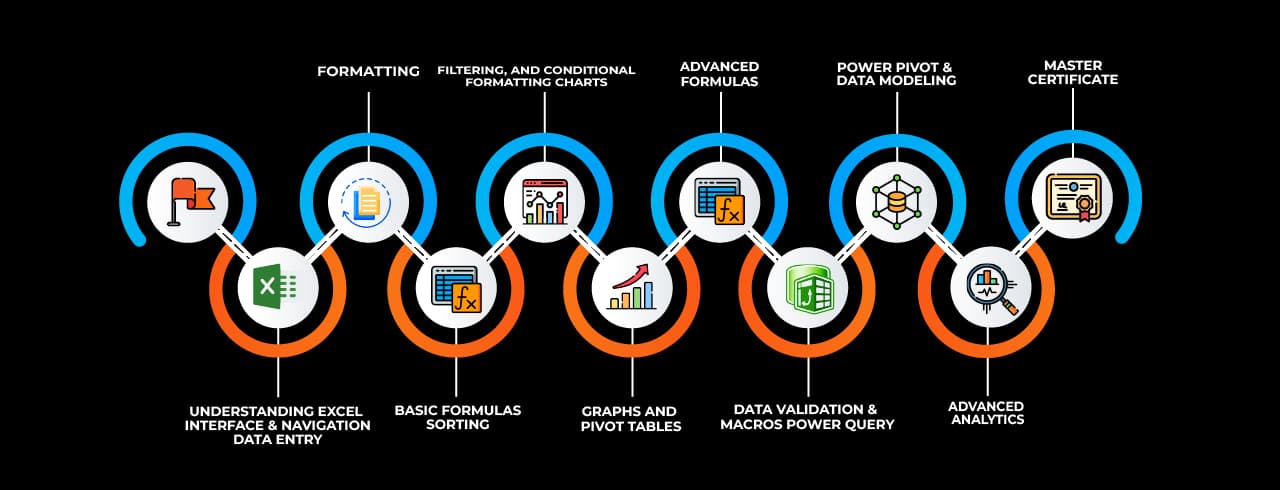
Learning curve for Advanced Excel

Master In Advanced Excel Course

OneCourseMultipleRoles

Empower your career with in-demand data skills and open doors to top-tier opportunities.

Advanced Excel Specialist
Excel Data Analyst
Excel Power User
Excel Consultant
Excel Dashboard Developer
Excel Automation Specialist (VBA)
Excel Reporting Analyst
Excel Trainer
Excel Power BI Integration Specialist
Excel Financial Analyst

Skills & Tools You'll Learn -

Pivot Tables iconPivot TablesSummarize, analyze, and visualize large datasets with interactive tables.
Power Query iconPower QueryAutomate data import, transformation, and cleaning from multiple sources.
Power Pivot  iconPower Pivot Perform advanced data modeling and analysis using DAX formulas.
Data Validation iconData ValidationControl and restrict data entry with rules and dropdown lists.
Conditional Formatting  iconConditional Formatting Highlight data based on conditions using colors, icons, and bars.
Solver  iconSolver Optimize decision-making by finding the best solution for complex problems.
Goal Seek iconGoal SeekAdjust input values to achieve a specific target outcome in formulas.
What-If Analysis iconWhat-If AnalysisSimulate different scenarios by changing input values dynamically.
Macros iconMacrosAutomate repetitive tasks using VBA to enhance productivity.
Data Tables iconData TablesAnalyze multiple outcomes of formulas by varying input values.
Text to Columns  iconText to Columns Split text into separate columns based on delimiters or fixed width.
Flash Fill  iconFlash Fill Automatically recognize and complete patterns in data formatting.
Charts & Graphs  iconCharts & Graphs Visually represent data insights using various chart types.
Remove Duplicates  iconRemove Duplicates Eliminate duplicate records to maintain clean and unique data.
Name Manager iconName ManagerDefine and manage named ranges for easier formula referencing.
Dynamic Arrays iconDynamic ArraysUse formulas that automatically expand to return multiple results.

Why Choose SevenMentor Advanced Excel

Empowering Careers with Industry-Ready Skills.

Specialized Pocket Friendly Programs as per your requirements

Specialized Pocket Friendly Programs as per your requirements

Live Projects With Hands-on Experience

Live Projects With Hands-on Experience

Corporate Soft-skills & Personality Building Sessions

Corporate Soft-skills & Personality Building Sessions

Digital Online, Classroom, Hybrid Batches

Digital Online, Classroom, Hybrid Batches

Interview Calls Assistance & Mock Sessions

Interview Calls Assistance & Mock Sessions

1:1 Mentorship when required

1:1 Mentorship when required

Industry Experienced Trainers

Industry Experienced Trainers

Class Recordings for Missed Classes

Class Recordings for Missed Classes

1 Year FREE Repeat Option

1 Year FREE Repeat Option

Bonus Resources

Bonus Resources

Curriculum For Advanced Excel

BATCH SCHEDULE

Advanced Excel Course

Find Your Perfect Training Session

Jan 4 - Jan 10

2 sessions
04
Sun
Classroom/ Online
Weekend Batch
10
Sat
Classroom/ Online
Weekend Batch

Jan 11 - Jan 17

1 sessions
12
Mon
Classroom/ Online
Regular Batch

Jan 18 - Jan 24

1 sessions
19
Mon
Classroom/ Online
Regular Batch

Learning Comes Alive Through Hands-On PROJECTS!

Comprehensive Training Programs Designed to Elevate Your Career

Sales Performance Dashboard (Excel)

Sales Performance Dashboard (Excel)

Financial Budget & Expense Tracker

Financial Budget & Expense Tracker

Inventory Management System (Excel)
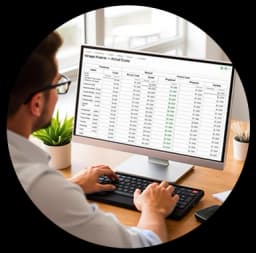
Inventory Management System (Excel)

Employee Attendance & Payroll Report

Employee Attendance & Payroll Report

Customer Data Analysis & Segmentation

Customer Data Analysis & Segmentation

No active project selected.

Transform Your Future with Elite Certification

Add Our Training Certificate In Your LinkedIn ProfileLinkedIn

Our industry-relevant certification equips you with essential skills required to succeed in a highly dynamic job market.

Join us and be part of over 50,000 successful certified graduates.

Student 1
Student 2
Student 3
Student 4
Student 5
Join 15,258 others learning today
Certificate Preview

KEY Features that Makes Us Better and Best FIT For You

Expert Trainers

Industry professionals with extensive experience to guide your learning journey.

Comprehensive Curriculum

In-depth courses designed to meet current industry standards and trends.

Hands-on Training

Real-world projects and practical sessions to enhance learning outcomes.

Flexible Schedules

Options for weekday, weekend, and online batches to suit your convenience.

Industry-Recognized Certifications

Globally accepted credentials to boost your career prospects.

State-of-the-Art Infrastructure

Modern facilities and tools for an engaging learning experience.

100% Placement Assistance

Dedicated support to help you secure your dream job.

Affordable Fees

Quality training at competitive prices with flexible payment options.

Lifetime Access to Learning Materials

Revisit course content anytime for continuous learning.

Personalized Attention

Small batch sizes for individualized mentoring and guidance.

Diverse Course Offerings

A wide range of programs in IT, business, design, and more.

Course Content

About Advance Excel Training in USA

Microsoft Excel has been the foundation of data analysis, business modelling, and administrative automation for decades. Excel's advanced version includes strong features such as dynamic dashboards, nested functions, Power Query, VBA scripting, and data visualization—skills that are in great demand across sectors. As data-driven decision-making continues to dominate modern enterprises, the demand for experts well-versed in advanced Excel methodologies has become more crucial than ever. Advance Excel Classes in USA offer learners an opportunity to gain hands-on experience and professional-grade competence in mastering one of the most influential tools in business computing.
 

Importance of Advanced Excel in the Modern Workplace

Advanced Excel skills extend well beyond fundamental spreadsheet navigation. They include the use of complicated formulas like INDEX, MATCH, INDIRECT, and ARRAYFORMULAS, as well as dynamic data models built with PivotTables, PowerPivot, and PowerQuery. These features enable experts to do multidimensional data analysis and automate typical business procedures. Excel's Visual Basic for Applications (VBA) is another notable feature that allows users to create custom macros and automate procedures, reducing manual effort and increasing operational accuracy.

Excel is widely used by professionals in finance, human resources, operations, sales, marketing, and supply chain management to manipulate enormous data sets, establish forecasting models, and create visually appealing reports. Excel professionals are increasingly expected to combine technical data work with business strategy due to its interface with other tools and platforms, including as SQL databases, Microsoft Power BI, and cloud-based systems.
 

Curriculum Structure of Advance Excel Classes in USA

The curriculum for Advance Excel Classes in USA at SevenMentor is meticulously structured to progress learners from fundamental operations to highly advanced concepts. The foundation contains fast cell reference, conditional formatting, and error handling with methods like IFERROR, ISNA, and IF. Following that, students will investigate advanced subjects such as data validation with custom formulas, 3D referencing, and auditing tools for tracking errors and managing workbook integrity.

The most transformational modules include dynamic dashboards. These are designed with form controls, interactive charts, and real-time data integration to provide executives and decision-makers with live analytical insights. Learners also learn proficiency in using Power Query to clean and manipulate raw datasets, merge queries, and construct relationships within data models. VBA programming forms the capstone of many SevenMentor Advance Excel training in USA programs, empowering users to script automation routines that can generate reports, clean data, or even interact with external applications like Outlook or Access.
 

Excel for Business Intelligence and Automation

As enterprises move toward integrated digital solutions, Excel's advanced capabilities play a pivotal role in bridging legacy data practices with modern analytics. With Power Query and Power Pivot, users can perform ETL (Extract, Transform, Load) operations within Excel, eliminating the need for additional software. These tools allow users to import data from multiple sources, including SQL servers, cloud storage, and APIs, and to perform transformation logic directly within the workbook.

Furthermore, Power Pivot users can use DAX (Data Analysis Expressions) to generate calculated columns and measures that refine analytical granularity. Excel's interface with Power BI also enables seamless data visualisation operations, allowing datasets created in Excel to serve as source models for interactive BI dashboards. VBA automation enables organisations to streamline report generation, client billing, and email automation.

These features are core components of SevenMentor’s Advance excel courses in USA, ensuring that learners are equipped with not just operational knowledge, but also strategic application insights for modern enterprises.
 

Project-Based Learning and Hands-On Case Studies

One of the distinguishing features of Advance excel Classes in USA at SevenMentor is the emphasis on real-world projects and business simulations. Learners are given raw datasets from domains like finance (e.g., sales revenue reports), human resources (e.g., payroll and employee performance logs), or operations (e.g., inventory movement data) and tasked with building analytical models, KPI dashboards, or forecasting tools.

These hands-on assignments mirror the actual duties of data analysts, business intelligence specialists, and administrative strategists. By including domain-specific Excel applications, the training not only reinforces technical skill learning but also allows for contextual awareness of how those skills affect business productivity.

Furthermore, learners frequently work on mini-projects that use various tools, such as Power Query for data purification, PivotTables for summarisation, and VBA for automation. This experiential learning method helps students prepare for job difficulties and improves employability.
 

Certification and Career Scope

Upon completion of Advance excel training in USA, learners are often awarded industry-recognized certifications that validate their technical expertise. These certifications can serve as a strong credential in the job market, especially for roles that involve data handling, performance reporting, or financial modeling.

Excel proficiency is routinely stated as a required skill in job descriptions for roles like Financial Analyst, Business Analyst, Project Manager, MIS Executive, and Operations Consultant. Employers are increasingly looking for individuals that can not only handle software, but also make data-driven decisions and optimise processes. Excel, when utilised at an expert level, can perform both of these duties concurrently.

Furthermore, proficiency in Excel often leads to cross-functional roles within organizations. As professionals become more adept at interpreting data, they are frequently brought into strategic planning meetings, giving them exposure to leadership roles and career growth opportunities. Training institutes like SevenMentor, the best training institute for Advance excel Training structure their programs to include mentoring, resume-building support, and mock interviews, giving learners an edge in competitive job markets.
 

Faculty Expertise and Learning Infrastructure

One of the major reasons for the success of SevenMentor’s Advance excel Classes in USA is the quality of faculty and the learning infrastructure. Trainers with industry experience bring real-time case studies into the classroom, bridging the gap between theoretical learning and practical application. Learners benefit from doubt-solving sessions, live demonstrations, and one-on-one mentoring.

Learning platforms often include access to simulation environments, pre-configured datasets, downloadable learning resources, and post-course support. Some programs also offer sandbox environments where learners can experiment with advanced functionalities like scripting and dynamic reporting without affecting production data.

Institutes like SevenMentor, the best training institute for Advance excel Training ensure that their trainers are Microsoft-certified and experienced in using Excel in enterprise environments. The combination of structured curriculum, expert guidance, and hands-on practice makes such training highly effective.
 

Continuous Assessment and Feedback Mechanism

An essential element of successful Excel training programs is continuous performance evaluation. Learners undergo periodic assessments through quizzes, assignments, and project reviews. These evaluations serve to reinforce learning and identify knowledge gaps early in the training process.

Feedback from teachers helps students focus on specific areas for growth, such as formula optimisation, logic building, or chart presentation aesthetics. Peer evaluations and collaborative problem solving are also advocated as ways to promote critical thinking and teamwork.

Post-training examinations imitate workplace duties, forcing students to generate dashboards, automate repetitive operations, or consolidate multi-source data within a set deadline. These examinations prepare students to deal with the pressures and expectations of real-world job situations.

For learners looking to build a strong foundation in data analysis and automation, enrolling in Advance excel courses in USA offers a strategic advantage. Whether you are a finance professional, business analyst, or operations manager, structured learning from expert-led programs can transform your capabilities and career trajectory. Institutions like SevenMentor, the best training institute for Advance excel Training offer industry-oriented programs that prepare learners for real-world challenges using a hands-on, practical approach. This is especially valuable in an environment where digital fluency and data literacy are key differentiators in hiring and promotion decisions.
 

Online Classes

SevenMentor offers flexible and comprehensive online Advance excel classes. Many learners prefer online Advance excel training in USA for its flexibility and accessibility. The online format supports self-paced modules, instructor-led live sessions, and real-time chat support for doubt resolution. Learners gain access to recordings of all sessions, ensuring that they can revisit concepts and master difficult techniques at their convenience.

Online platforms often simulate enterprise environments using virtual labs, allowing learners to work with large datasets, dynamic Excel models, and automation scripts. With continuous assessment and trainer feedback integrated into the learning management system, online training offers a comprehensive educational experience equivalent to in-person classes. For working professionals, this format is especially beneficial, allowing them to balance work and education effectively.
 

Corporate Training 

SevenMentor offers customized corporate Advance excel training in USA Customized corporate training programs are designed based on an organization's specific use cases—be it financial reporting, KPI dashboarding, or automation of HR workflows.

Corporate training modules can be delivered on-site or remotely and often include pre-training assessments to identify knowledge gaps and post-training evaluations to measure effectiveness. Training is aligned with organizational goals and uses actual business data (sanitized for privacy) to ensure relevance. Expert trainers from institutions like SevenMentor, the best training institute for Advance excel Training bring domain-specific experience and tailor the sessions for various departments including finance, marketing, HR, and supply chain.

Frequently Asked Questions

Everything you need to know about our revolutionary job platform

1

What is Excel?

Ans:
Microsoft Excel is a spreadsheet application that allows you to store data in cells. A spreadsheet is a great way to store and organize data.
2

What are pivot tables and how they are used.

Ans:
Excel's pivot tables are strong instruments that let users organize, examine, analyze, and summarize vast volumes of data. By creating customized views by dragging and dropping fields into rows and columns, they allow users to extract valuable information.
3

What is Microsoft Advanced Excel?

Ans:
Microsoft Advanced Excel makes it easier to use high recognition functions and formulas when working with complex datasets. This covers things like conditional formatting, vlookup, vba macros, pivot tables, and consolidation.
4

What are the basic Excel formulas?

Ans:
The basic Excel formulas are- 1. SUM 2. AVERAGE 3. COUNT 4. COUNTA 5. IF 6. TRIM 7. MAX & MIN
5

Who is this course for?

Ans:
This Advanced Excel course is suitable for anyone who wants to learn Excel. No prior knowledge of Excel is required. Whether you are a business professional, student, teacher, freelancer, or solopreneur, this training can benefit you and help you take your Excel skills to the next level. Excel is the most used spreadsheet software across the globe, and is considered essential in many industries like administration, accounting, construction, real estate, sales and marketing to name a few.
6

Do you have other online Excel courses?

Ans:
Yes, we do! Here are the other Excel courses we offer: Basic Excel Advanced Excel Pivot Tables Macros and VBA Dashboards Power Query Power Pivot Power BI
7

What is the difference between Basic Excel and Advanced Excel?

Ans:
Advanced Excel is different from Basic Excel since use has to focus more on DSUM, DCOUNT, Pivot Table, Pivot Chart, Formulas, Functions, and Macros.
8

Is this Advanced Excel Course beneficial?

Ans:
Yes, having strong Excel skills can help you land a good job. Project management, data analysis, and finance are among the industries that require proficiency with Excel. It increases output, streamlines complex processes, and provides access to jobs such as operations manager, finance analyst, and data analyst. Earning potential and employment options may rise with the addition of certifications.
9

What are the prerequisites for this course?

Ans:
There are no prerequisites required to join our Advanced Excel Course. Though basic excel knowledge can be useful. We are also going to cover basic excel before jumping to advanced excel.
10

Who can do this course?

Ans:
The course specifically requires no requisites as we work on students right from beginner levels. Anyone with basic Personal computing expertise can take this course.
11

Are SevenMentor's Advanced Excel trainers certified?

Ans:
Our instructors are certified experts with immense experience of data in the various industries. Our experts will provide you insights into current trends and relevant technologies that will help you get more into practicality of the subject than just theoretical knowledge.
12

What's the fee structure for Advanced Excel Course?

Ans:
Cost varies by course duration and format (online/offline). Contact our counselors for current fees - we offer installment plans making it easy for more students to afford.
13

Will I get a certificate after completing the Advanced Excel course offered by SevenMentor ?

Ans:
Yes! We provide a certificate after successful completion of the course. Our certificate is accredited globally and will add immense value to your skills and resume
14

Will you provide placement?

Ans:
We don’t directly provide placements, though our placement assistance team will conduct mock interviews and assessment. We will help you with updating resumes to help you prepare for job interviews.
15

How to join SevenMentor's Advanced Excel Course?

Ans:
Visit our center or website to schedule a free level-check test. We'll recommend the right batch for you. Limited seats available - book early to secure your spot before intake deadlines.

Explore Other Demanding Courses

No courses available for the selected domain.