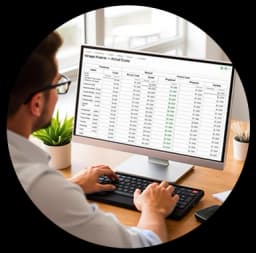
What is the structure of SevenMentor's advanced Excel course?
In this course you will learn how to use Microsoft Excel for data management. SevenMentor’s Advanced Excel training for corporate professionals & data analysts & data users—freshers / jobbers—helps to create data automation, data validation, and develop reporting dashboards of complex data. Here, at the beginning of the course, real-time problems of running an organization are created & solved. In that way, a student gets to know how to give a summary in management information system format. Also, how to fix calculation errors, which normally occur while doing a summary of multiple departments for monthly reports. All the topics are made in the form of assignments. Students will get to know how to use Excel for the day-to-day work of the sales team, HR team, account team & operation team in a company.
As you become proficient in data analysis, we take your learning to the next level of data transformation techniques. You will create data structures, such as consolidating data from different monthly reports into a summary report that can be used for creating a report for MIS (Management Information System). You can apply all your knowledge of logical and formatting techniques to creating a professional report. Our assignments mirror the workflows of sales, HR, accounting, and even logistics teams as you practice with industrial datasets. Within no time, you would become a power user and start treating Excel as a complete framework for business intelligence and create reports for the management information system.
- Comprehensive Data Cleaning: Error isolation, removing unwanted formatting and reorganizing disorganized spreadsheet information to perform reporting and other data-related functions efficiently.
- Logical and Contextual Formulas: Build on top of previous formula skills and learn to write combined conditional formulas (using logical operators) to pull out information from raw data to answer complex business questions.
- Interactive MIS Summary Creation: Create a dynamic MIS summary for department summaries and automatically generate reports that are suitable for C-level executives for review.
- Real-World Case Studies: Learn to apply your skills using industrial datasets of financial budgets, HR data, operations data, and sales data.
Why are Advanced Excel Skills Crucial for Today's Competitive Job Market?
The role that data plays in modern global corporations is becoming more and more prevalent, and in most cases that data will travel through a spreadsheet along the way. That data will be used by global corporations, mid-sized firms, and fast-growing start-ups to measure and log on a daily basis the productivity of their employees, predict future revenue and core operational performance of their businesses, and report on results to other employees along the way. A basic knowledge of how to type and do arithmetic is all that is required to deal with such basic ‘data logging,' and as a result, such work can cause little or no strain on the brain of that employee or the physical effort required by them. In contrast, the optimized use of the more advanced analytics in a spreadsheet, which are becoming more and more widely available, is able to save hundreds of hours per year of manual report updating for employees that use such tools, in effect enabling them to work with minimal stress and strain in a consistent and positive manner, executing business analysis of great complexity with equal ease and confidence.
Many industries such as auditing, accounting, operations, HR, and business intelligence rely heavily on the in-depth data analysis methods provided by Advanced Excel. Demonstrating advanced Excel skills by acquiring certified expertise in these spreadsheets can be a major selling point on your resume and be picked up by corporate recruitment. Using the in-depth data transformation techniques of Advanced Excel maximizes a person’s corporate value and creates the opportunity to process information on an extremely high level while greatly increasing potential for professional growth. As such, those who are able to transform rows and columns of data into highly organized and informative reports can become a huge asset to any administrative or strategic team.
- Maximized Workplace Efficiency: Turn repetitive, hours-long data tasks into momentary automated events using optimized shortcuts and dynamic setups.
- Flawless Informational Auditing: You will be able to cross-reference information in different datasets, find calculation errors in reports generated by your company, and more importantly, keep your reports 100% accurate.
- Increased Chance of Promotion to Higher-Salaried Positions: MIS Executive, Business Analyst, Financial Analyst, and Operations Manager are all positions where possessing advanced Excel skills will significantly improve chances for advancement.
- Informed Business Decision-Making: Create perfect spreadsheets to help executive stakeholders evaluate and make the best decisions concerning the company's operational risks and market trends.
What are the main advantages of learning advanced Excel at SevenMentor?
Whether you are an advanced learner or just starting to learn Microsoft Excel, our Advanced Excel course is a practical course to learn Excel's advanced features and become proficient in utilizing the powerful analytical capabilities of Excel. SevenMentor’s highly skilled and experienced trainers from the corporate world use real-life corporate data to teach how to apply the advanced Excel features to real-life business scenarios. The course is designed as an interactive session where participants learn the application of advanced features by completing practical exercises and also by understanding the data transformation techniques used in a real corporate environment. The course is designed to be a small group training session, so that each participant receives individual attention, and also receive support in resolving any logical errors, in creating professional worksheets, in learning formula scripting, etc.
SevenMentor’s extensive and unique learning architecture is not limited to hours of classroom learning sessions, as our learners have access to various support groups who can assist them outside of class too. So if ever you need to clarify any logical aspects of a lesson, obtain feedback on a professional worksheet you designed, or even iron out bugs in the formula script, you can do so instantly. Also, as our learners prepare to apply for jobs, the SevenMentor career placement team can work with them in restructuring their profiles. We shall also then show them how they can list their reporting skills and other analytical capabilities, as well as their advanced Excel training, objectively in order to easily clear any corporate interview.
- Our Corporate-Experienced Educators: Learn from certified data specialists with years of experience in data in the corporate world.
- Interactive Practical Exercises: It is vital to reinforce the conceptual knowledge that one gains through practical implementation. The various data scenarios and data exercises, including formula cleanup, pivot table, and report generation will help one to solidify his/her learning in Advanced Excel Training.
- Dedicated Post-Class Support: Our expert team of trainers are always available to help you with any logical doubts, personal worksheets, formula scripts, and any other queries even after the completion of class.
What Key Topics Will You Master in This Advanced Excel Program?
SevenMentor's Advanced Excel Training is delivered through a comprehensive comprehensive course, designed as a sequential and modular approach to helping students master the advanced capabilities of the software. At the beginning of the course, students learn how to set up a workbook, managing data within a large data set, to avoid software limitations. As they gain a solid grasp of the fundamentals to create a good data layout, they progress to learning advanced data extraction techniques using data matrices. They will also gain mastery of the powerful lookup functions, including VLOOKUP, XLOOKUP, and INDEX–MATCH functions, explained with examples of how to use these functions to look up information in other sheets of a multi-sheet model. Students will also learn how to set up nested conditional statements and learn how to apply advanced data formatting, including managing text and date variables. They will also learn how to use the powerful functions to manage information in spreadsheets that contain data that has been exported from large Enterprise Resource Planning (ERP) applications.
Our most advanced Excel data analysis courses start from where most of other Excel training ends. The major focus is to help you with the complex data analysis by setting up the framework of analyzing large data sets. The students learn to extract the information from the data with the help of advanced Excel matrices. This includes learning the real-life scenario-based setup of lookup functions, i.e., VLOOKUP, XLOOKUP, and INDEX–MATCH. Students are also able to use these lookup functions on multi-sheet models to map the information. At the same time, they are also able to create advanced conditional statements that are nested and used for the summary of the large data set. Students also learn to use advanced formatting to manipulate the large amount of text and date-based information that is received from ERP applications in the form of spreadsheets.
- Advanced Lookup Systems: Go beyond simple search and learn to create powerful, error-free lookups using XLOOKUP and dynamic arrays.
- Building Logical Frameworks: Learn to build complex logical tests that enable true automation of grading, pricing, and compliance based on multiple combined conditions.
- Create reports automatically: Create interactive reports with charts, slicers, and conditional formatting that change instantly to show shifts in performance metrics for your company.
- Macro Automation Basics: Eliminate daily operational bottlenecks by learning how to record, test, and run basic automated macros for high-speed reporting.
Can You Learn This Advanced Excel Course through Interactive Online Classes?
Our virtual online advanced Excel training program for professionals has been uniquely designed for work in the online space and is totally optimized to deliver a premium program of exactly the same standard to people located anywhere in the world and work from anywhere. As with all our Excel training program, whether held face-to-face at a training center or as online advanced Excel training sessions, the ultimate learning experience comes through live virtual sessions and not through pre-recorded generic programs of video clips. Here, in an online form, you shall have the ability to communicate with an industry-experienced expert on a real-time basis via your live screens and share your terminal for them to check your code and for you to check theirs as required, including during live lab sessions of the advanced use of Excel formulas. As is the case with face-to-face learning at a physical training center, all our virtual online training sessions contain all the interactive activities, etc., which are needed to form a fully complete virtual online learning environment.
We ensure that our online learners get the same amount of hands-on practice sessions and study material that a learner would get in a physical classroom. The digital course archive of our online Excel course program is continuously available for our learners. If a learner is unable to attend a live class due to any urgent meeting or encounters any complex formula during practice, he or she can access the complete high-definition recorded sessions of all the classes in the virtual learning dock. The learners can access all the full-length sessions, short conceptual videos, and all the study materials like industrial case-study workbooks, practice sessions, and corporate datasets in the virtual learning dock.
- Live Virtual Interactivity: Industry expert SevenMentor's tutors lead live screensharing sessions that are followed by real-time audio and text chat to aid Q&A.
- Continuous Lecture Archives: Access all the recorded sessions in high-quality HD from the virtual learning dock. Go through the in-depth reporting techniques as and when you want.
- Same Practical Materials: As a participant of an online Excel training program, you would go through the same type of industrial datasets, same data-cleansing modules, and same project workbooks as students enrolled in the Advanced Excel course in the classroom.
- Flexible Schedule Management - You can study from any location in the world and manage your work schedule and personal life effectively.
Does SevenMentor provide specialized advanced Excel training for corporate teams?
Administrative operational friction in today’s corporate environment frequently stems from unsophisticated management of spreadsheets. SevenMentor’s Corporate Advanced Excel Training is designed from the ground up, keeping in mind the day-to-day operations of a company and helping its employees work at optimal levels of productivity. Whether it is for a company’s accounting department struggling to reconcile books, or large MIS reports on a monthly basis, or for the sales department to analyze sales conversion, or for a company’s manufacturing department works with a large number of sheets; our training will equip employees to work at their best.
SevenMentor expert corporate trainers study the files, workflows, and production methods of the organization before creating highly targeted, practical, and specialized corporate advanced Excel training sessions and programs for your personnel. Our trainers and experts know how to identify problem areas in an organization, such as delays in production or errors in spreadsheets and work flows that cause hours of manual work while increasing chances of human error. SevenMentor can help your organization create automated verification checks, enable reliable data reporting, and minimize manual workload in spreadsheets and other data-driven workflows. All the classes are extremely practical in nature, where the participants will be able to work on the actual files, sheets, and production methods that are used by them in their organization.
- Workflow-Specific Customization: SevenMentor will create the instructional framework with reference to your current corporate templates, financial sheets, and reporting pipes.
- Pre-Training Skills Audit: We will do a skills audit prior to training to ensure that the right pace is set so that maximum benefit is gained from the training.
- Cut Unnecessary Work Hours: Automate repetitive work within minutes and save hundreds of hours of work amongst employees.
- Flexible Corporate Delivery Options: SevenMentor provides training through interactive on-premise classroom training and also through our secure virtual classroom delivery to multiple global offices.
How Does SevenMentor Directly Address Common Training and Placement Challenges?
SevenMentor bridges the inevitable gaps in technical training courses by re-engineering the complete learning experience. The strict quality checks, steady study schedule, and transparent corporate placement policy ensure a steady & meaningful experience from day 1 of your course to the day of your final interview.
Our rigorous and effective course content is designed with a singular focus: your accountability for learning to become a true analytical master and our delivering of a guaranteed placement in a suitable role upon completion of your studies as opposed to shallow advertising and poor-quality course content.
- Guaranteed Learning Format: Lock your chosen learning format (classroom or live online interactive learning) once you’ve enrolled. You won’t have to worry about any format changes while you’re on our program.
- Quality Curriculum: Our accountabilities manifest into a robust curriculum that is aimed at imparting accountability towards learning advanced business logic & data automation—towards becoming a master analyst for real-world scenarios. Our Certified Corporate Specialists—instructors—shall impart formulas learned by students in classrooms through interactions in classroom sessions or live interactive sessions online held as scheduled—the Learning Format promised & guaranteed.
- Career Alignment: The career alignment team at SevenMentor carefully screens all partner companies for guaranteed placements in suitable roles for the student like MIS Executive or Business Analyst with no job bonds or mismatched internships.
- Our Way of Student Advocacy: We stand for the student’s freedom to choose his / her own career, and we don’t tie any student’s to any job in hidden terms and conditions for his / her financial gains. The student can choose to not accept an offer if he / she finds that the offered job is not best for his / her career.
How Does Advanced Excel Synergy Connect You with Other Top Tech Ecosystems?
With the integration of various technologies, the BI functionality can’t remain confined to the spreadsheets. The operational efficiency can be derived only when the spreadsheets can easily communicate with the database, cloud, AI platforms, etc. And this can happen only when you know how to manage the data. At SevenMentor, we believe that learning to manage data can easily transition you to advanced technical subjects. It can be using data from the ERP system for creating the spreadsheet and using the cleaned data created in the spreadsheets for building the machine learning model and generating reports, which can be easily read by the C-level executives of the organization. All this can happen only when you can structure the data in the spreadsheets in the required format and apply required analytical logic.
By learning to set up, manage, and run data in your spreadsheet, you can immediately transfer that knowledge and skill to other areas of technology used across the organization, such as:
- Data Science & Data Analytics: Stewards of data who make use of the data cleansing habits learned in spreadsheets and developers of data-driven web applications that track user behavior or system performance in detail.
- Python & DevOps: Bridge the gaps between your prototyping spreadsheets and large-scale back-end development by aligning your data logic with ongoing development in the context of continuous integration and continuous deployment.
- Cloud Computing & Cyber Security: Learn how data is moved across the globe over the Internet and how to keep your scalable applications as well as your financial spreadsheets secure.
- SAP & Salesforce: Enable your custom reporting workbooks to integrate seamlessly with enterprise solutions like SAP and powerful web-based global operation management solutions like Salesforce.com.
- Generative AI, AI & ChatGPT Courses: You can use intelligent application frameworks and integrate AI-powered chatbots into your data parsing tasks and build a smart analytics interface.
- Power BI & Java: Even heavy numbers with large amounts of data will easily be transferred to highly interactive data visualizations or even run as robust, enterprise-scale web applications.
Got Questions? Here Are Some FAQs
1. What is an Advanced Excel Course?
An Advanced Excel Course is a comprehensive training that covers advanced features of Excel such as creating reports using Pivot Tables and Pivot Charts, data manipulation using Power Query, advanced formulas, creating dashboards, data analysis and automation.
2. Who should join an Advanced Excel Course?
This course will greatly benefit to students, working professionals, accountants, data analysts, HR executives and any other individuals that look to improve their Excel skills to seek new job opportunities.
3. What skills will I learn in an Advanced Excel Course?
In the course you will learn among others the advanced formulas, the Pivot Tables and the Pivot Charts, the Power Query, the data validation, the conditional formatting, the creation of dashboards, the macros and the report automation.
4. Is an Advanced Excel Course useful for getting a job?
Yes, Advanced Excel is one of the most in-demand skills required to obtain employment in various organizations including finance, HR, sales, operations, business analysis and data reporting functions.
5. Do I need basic Excel knowledge before joining an Advanced Excel Course?
Yes, it is essential that you have basic knowledge of using an Excel Worksheet such as inserting, deleting rows and columns, working with formulas, using basic formatting options etc. Having such prior knowledge will help you grasp the advanced topics covered in this course more efficiently.
blog Links:
Anthropic AI Tool
What is Writesonic
What is Claude AI
AI Engineer Roadmap
What is JasperAI
What is Copy AI
Do visit our channel to know more: SevenMentor
 Build expert-level Excel skills with SevenMentor’s Advanced Excel Course.
 Master data analysis, automation, and visualization techniques to enhance efficiency.
 Gain the confidence to tackle complex Excel tasks and advance your career opportunities.
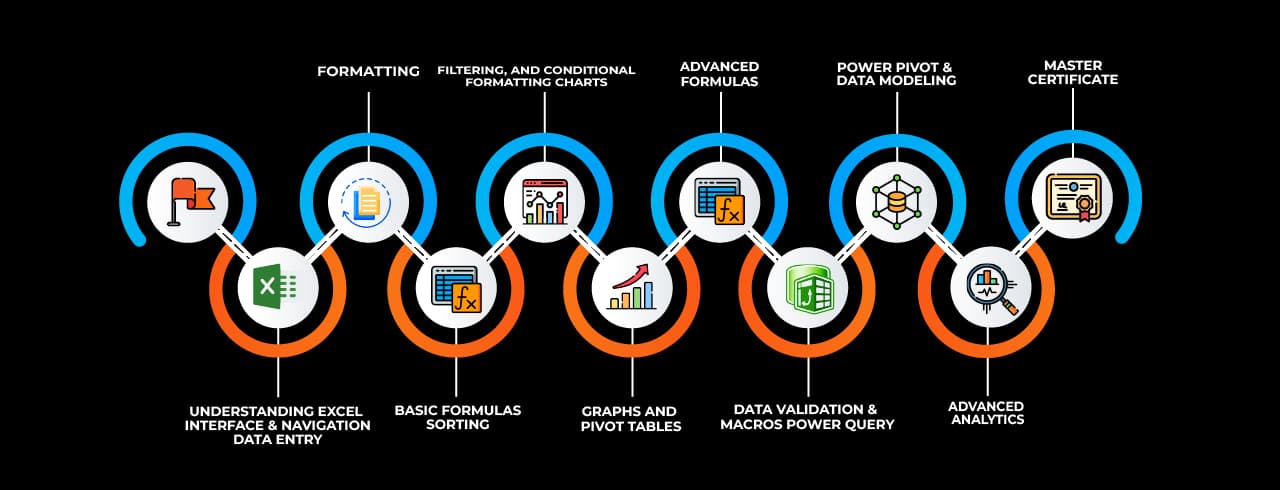
 Pivot TablesSummarize, analyze, and visualize large datasets with interactive tables.
 Power QueryAutomate data import, transformation, and cleaning from multiple sources.
 Power Pivot Perform advanced data modeling and analysis using DAX formulas.
 Data ValidationControl and restrict data entry with rules and dropdown lists.
 Conditional Formatting Highlight data based on conditions using colors, icons, and bars.
 Solver Optimize decision-making by finding the best solution for complex problems.
 Goal SeekAdjust input values to achieve a specific target outcome in formulas.
 What-If AnalysisSimulate different scenarios by changing input values dynamically.
 MacrosAutomate repetitive tasks using VBA to enhance productivity.
 Data TablesAnalyze multiple outcomes of formulas by varying input values.
 Text to Columns Split text into separate columns based on delimiters or fixed width.
 Flash Fill Automatically recognize and complete patterns in data formatting.
 Charts & Graphs Visually represent data insights using various chart types.
 Remove Duplicates Eliminate duplicate records to maintain clean and unique data.
 Name ManagerDefine and manage named ranges for easier formula referencing.
 Dynamic ArraysUse formulas that automatically expand to return multiple results.