Introduction
Java is a robust object-oriented programming language known for its emphasis on security, modularity, and maintainability. One of the core features that enables these principles is access control, implemented through access modifiers.
Understanding Java access modifiers is essential for writing clean, secure, and scalable applications. Whether you are a beginner learning Java or a professional preparing for technical interviews, mastering this concept will significantly improve your coding practices.
In this guide, we will explore the types of Java access modifiers, their use cases, real-world applications, and best practices.
What Are Access Modifiers in Java?
Access modifiers in Java are keywords used to define the visibility or scope of classes, methods, variables, and constructors.
They control how different parts of a program interact with each other, ensuring proper data protection and encapsulation.
Primary Keywords:
- Java access modifiers
- Access control in Java
- Java encapsulation
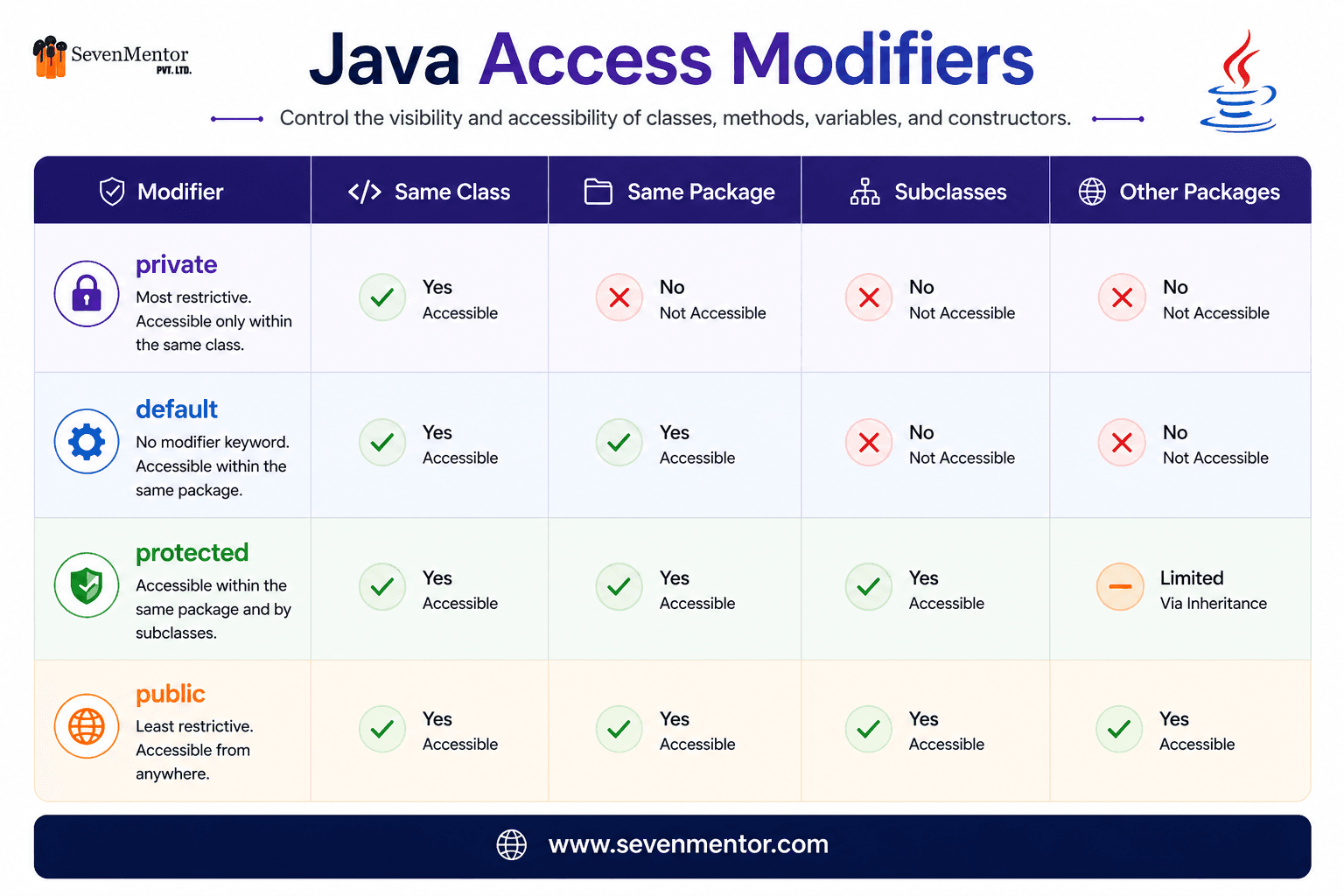
Java provides four types of access modifiers:
- private
- Default (no modifier)
- protected
- public
Why Are Access Modifiers Important?
Using access modifiers effectively offers several advantages:
- Ensures encapsulation (data hiding)
- Enhances application security
- Prevents unauthorized access
- Improves code maintainability
- Supports scalable application design
Example:
In a banking system, sensitive data such as an account balance should not be directly accessible from outside the class. Access modifiers help enforce this restriction.
Types of Access Modifiers in Java

1. Private Access Modifier
The private modifier provides the highest level of restriction.
Key Features:
- Accessible only within the same class
- Not accessible outside the class
- Commonly used for variables and sensitive data
Example:
class User {
private String password = "abc123";
public String getPassword() {
return password;
}
}
2. Default Access Modifier (Package-Private)
When no modifier is specified, Java assigns default access.
Key Features:
- Accessible within the same package
- Not accessible outside the package
Example:
class Product {
String name = "Laptop";
void display() {
System.out.println(name);
}
}
3. Protected Access Modifier
The protected modifier allows access within the package and to subclasses.
Key Features:
- Accessible within the same package
- Accessible in subclasses (even in different packages)
Example:
class Animal {
protected void sound() {
System.out.println("Animal sound");
}
}
class Dog extends Animal {
void bark() {
sound();
}
}
4. Public Access Modifier
The public modifier provides the widest level of accessibility.
Key Features:
- Accessible from anywhere in the program
- No access restrictions
Example:
public class Demo {
public void show() {
System.out.println("Hello");
}
}

Explore Other Demanding Courses
No courses available for the selected domain.
Access Modifiers for Classes in Java
Java restricts the use of access modifiers for top-level classes.
Allowed:
- public
- Default
Not Allowed:
- private
- protected
Example:
public class Main {
}
Real-World Example
Consider a banking application:
- Account balance → private
- Branch details → Default
- Manager operations → protected
- Customer services → public
This layered approach ensures data security, controlled access, and proper system design.
Best Practices for Using Access Modifiers
To write clean and maintainable Java code:
- Use private for all variables by default
- Provide access via getters and setters
- Avoid unnecessary use of public
- Use protected only when inheritance requires it
- Follow the Principle of Least Privilege
Common Mistakes to Avoid
- Declaring all variables as public
- Ignoring encapsulation principles
- Confusing default and protected access
- Using incorrect access levels in large-scale applications
Conclusion
Java access modifiers play a critical role in controlling visibility, ensuring security, and maintaining a well-structured codebase. They are fundamental to implementing encapsulation and promoting best practices in object-oriented programming.
By understanding when and how to use private, default, protected, and public, developers can build secure, scalable, and professional Java applications.
Frequently Asked Questions (FAQs):
1. What are access modifiers in Java?
Access modifiers in Java are keywords used to define the visibility and accessibility of classes, methods, variables, and constructors. They help control how different parts of a program can be accessed, ensuring better security and encapsulation.
2. What are the four types of access modifiers in Java?
The four types of access modifiers in Java are private, default (package-private), protected, and public. Each modifier defines a different level of accessibility within classes, packages, and inheritance structures.
3. Why is the private access modifier important in Java?
The private access modifier is important because it provides the highest level of data protection. It restricts access to variables and methods within the same class, helping in implementing encapsulation and preventing unauthorized access.
4. What is the difference between protected and default access modifiers?
The default access modifier allows access only within the same package, whereas the protected modifier allows access within the same package and also to subclasses, even if they are in different packages.
5. Can we use private and protected modifiers for classes in Java?
No, private and protected access modifiers cannot be used for top-level classes in Java. Only public and default modifiers are allowed for top-level class declarations.
Related Links:
Java Design Patterns You Should Learn
Do visit our channel to know more: SevenMentor
Author:-
Srushti Kulkarni
Srushti Kulkarni
Expert trainer and consultant at SevenMentor with years of industry experience. Passionate about sharing knowledge and empowering the next generation of tech leaders.
Call the Trainer and Book your free demo Class..... Call now!!!
| SevenMentor Pvt Ltd.
© Copyright 2025 | SevenMentor Pvt Ltd.