Mechanical CAD Course

feature-iconAccelerate Your Career with Professional AutoCAD Mechanical Training.
feature-iconGain Expertise in 2D Drafting, 3D Modeling, and CAD Techniques for High-Precision Design.
feature-iconTransform Your Technical Skills with SevenMentor’s Comprehensive AutoCAD Mechanical Certification Program.

020 71173070

Start Today!

CONSULT WITH
OUR ADVISORS

  • Course & Curriculum Details
  • Flexible Learning Options
  • Affordable Learning
  • Enrollment Process
  • Career Guidance
  • Internship Opportunities
  • General Communication
  • Certification Benefits

Learning Curve for AutoCAD Mechanical
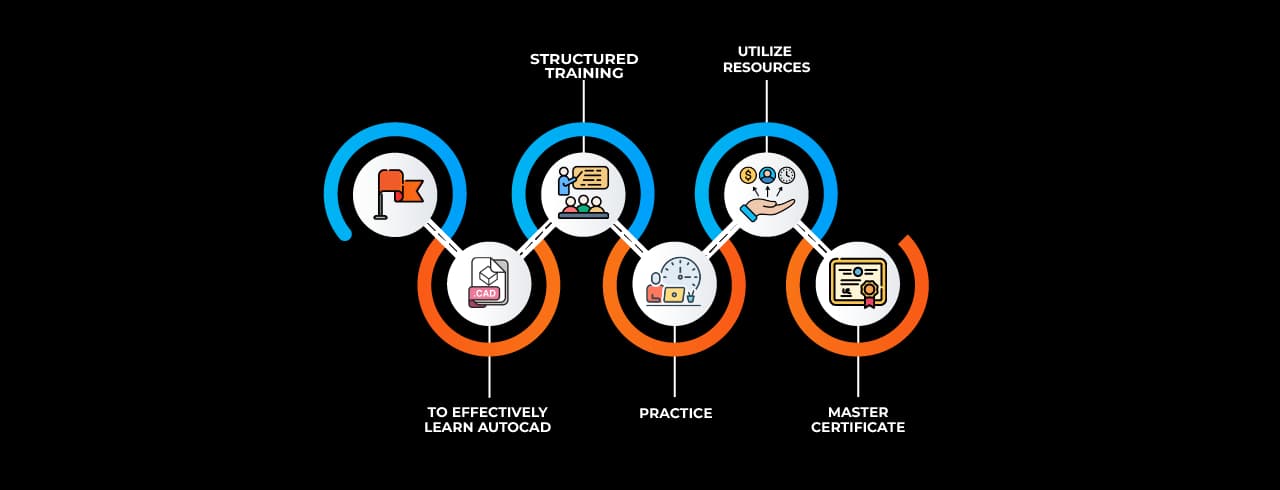
Learning curve for AutoCAD Mechanical

Master In AutoCAD Mechanical Course

OneCourseMultipleRoles

Empower your career with in-demand data skills and open doors to top-tier opportunities.

AutoCAD Engineer
Mechanical CAD Drafter
Mechanical CAD Designer
AutoCAD Mechanical Engineer
Mechanical Design Engineer
Mechanical Draftsman
Piping Designer
HVAC CAD Designer
Sheet Metal Designer
Tool and Die Designer
Product Design Engineer

Skills & Tools You'll Learn -

2D AutoCAD Basic Drawing Tools (Line, Circle, Rectangle, Arc) icon2D AutoCAD Basic Drawing Tools (Line, Circle, Rectangle, Arc)Essential tools for creating fundamental geometric shapes and drafting basic 2D designs.
Modify Commands (Move, Copy, Rotate, Scale, Mirror, Offset) iconModify Commands (Move, Copy, Rotate, Scale, Mirror, Offset)Commands used to edit, reposition, and duplicate objects efficiently within a drawing.
Layers Management (Creating, Editing, Freezing, Locking) iconLayers Management (Creating, Editing, Freezing, Locking)Organizing drawing elements by assigning them to layers for better visibility and control.
Annotation Tools (Text, Dimensions, Leaders) iconAnnotation Tools (Text, Dimensions, Leaders)Features used to add textual information, measurements, and leader lines for clear documentation.
Hatching and Gradient Fills iconHatching and Gradient Fills Techniques for applying patterns and color gradients to enclosed areas for visual distinction.
Blocks and Attributes iconBlocks and AttributesCreating reusable symbols and adding dynamic text or data fields to objects for efficient design.
Object Snaps (OSNAP) and Tracking iconObject Snaps (OSNAP) and TrackingPrecision tools that assist in accurately selecting and aligning drawing elements.
Polyline and Spline Editing iconPolyline and Spline EditingModifying complex linear and curved paths to achieve precise shape control.
Trim and Extend Commands iconTrim and Extend CommandsTools for adjusting line lengths by cutting or extending them to meet other objects.
Array (Rectangular, Path, Polar) iconArray (Rectangular, Path, Polar)Automated duplication of objects in structured patterns along grids, paths, or circular arrangements.

Why Choose SevenMentor AutoCAD Mechanical

Empowering Careers with Industry-Ready Skills.

Specialized Pocket Friendly Programs as per your requirements

Specialized Pocket Friendly Programs as per your requirements

Live Projects With Hands-on Experience

Live Projects With Hands-on Experience

Corporate Soft-skills & Personality Building Sessions

Corporate Soft-skills & Personality Building Sessions

Digital Online, Classroom, Hybrid Batches

Digital Online, Classroom, Hybrid Batches

Interview Calls Assistance & Mock Sessions

Interview Calls Assistance & Mock Sessions

1:1 Mentorship when required

1:1 Mentorship when required

Industry Experienced Trainers

Industry Experienced Trainers

Class Recordings for Missed Classes

Class Recordings for Missed Classes

1 Year FREE Repeat Option

1 Year FREE Repeat Option

Bonus Resources

Bonus Resources

Curriculum For AutoCAD Mechanical

BATCH SCHEDULE

AutoCAD Mechanical Course

Find Your Perfect Training Session

Dec 28 - Jan 3

2 sessions
28
Sun
Classroom/ Online
Weekend Batch
03
Sat
Classroom/ Online
Weekend Batch

Jan 4 - Jan 10

1 sessions
05
Mon
Classroom/ OnlineToday
Regular Batch

Jan 11 - Jan 17

1 sessions
12
Mon
Classroom/ Online
Regular Batch

Learning Comes Alive Through Hands-On PROJECTS!

Comprehensive Training Programs Designed to Elevate Your Career

Residential Floor Plan Design

Residential Floor Plan Design

Mechanical Component Drawing

Mechanical Component Drawing

Electrical Circuit Diagram
Electrical Circuit Diagram

Structural Steel Frame Design

Structural Steel Frame Design

Urban Road and Traffic Design

Urban Road and Traffic Design

No active project selected.

Transform Your Future with Elite Certification

Add Our Training Certificate In Your LinkedIn ProfileLinkedIn

Our industry-relevant certification equips you with essential skills required to succeed in a highly dynamic job market.

Join us and be part of over 50,000 successful certified graduates.

Student 1
Student 2
Student 3
Student 4
Student 5
Join 15,258 others learning today
Certificate Preview

KEY Features that Makes Us Better and Best FIT For You

Expert Trainers

Industry professionals with extensive experience to guide your learning journey.

Comprehensive Curriculum

In-depth courses designed to meet current industry standards and trends.

Hands-on Training

Real-world projects and practical sessions to enhance learning outcomes.

Flexible Schedules

Options for weekday, weekend, and online batches to suit your convenience.

Industry-Recognized Certifications

Globally accepted credentials to boost your career prospects.

State-of-the-Art Infrastructure

Modern facilities and tools for an engaging learning experience.

100% Placement Assistance

Dedicated support to help you secure your dream job.

Affordable Fees

Quality training at competitive prices with flexible payment options.

Lifetime Access to Learning Materials

Revisit course content anytime for continuous learning.

Personalized Attention

Small batch sizes for individualized mentoring and guidance.

Diverse Course Offerings

A wide range of programs in IT, business, design, and more.

Course Content

About Mechanical CAD Course

SevenMentor Training Mechanical CAD Classes are focused on providing students with an enhanced understanding of computer-aided design (CAD) software and its uses in mechanical engineering. Mechanical CAD (Computer-Aided Design) is a critical technology used by designers and engineers for designing, analyzing, and modifying mechanical components and systems. It bridges the gap between the concept stage and the production stage to allow experts to design intricate parts with accuracy and efficiency. SevenMentor Training provides the Mechanical CAD Course that allows students to learn the knowledge and skills to transform engineering concepts into accurate digital models to enable them to deal with today's product design and manufacturing sectors.

The program is especially appropriate for students, engineers, and working professionals who want to improve their technical know-how in product visualization, design automation, and drafting. It focuses on offering hands-on, real-world experience with CAD software used across industries such as automotive, aerospace, consumer products, and industrial equipment design. The SevenMentor Training Mechanical CAD Training guarantees that all trainees gain prolonged experience in mechanical design processes and CAD software usage to achieve world-class design accuracy and speed.

What is Mechanical CAD, and Why Should You Pursue a Career in It

Mechanical CAD involves the application of computer-aided design software to create and optimize 2D and 3D models of mechanical systems, assemblies, and components. It transforms the way mechanical engineers design, simulate, and validate products before manufacturing. CAD tools facilitate accurate modeling, stress analysis, and design optimization, which are critical to guaranteeing product quality and performance.

A career in Mechanical CAD establishes a broad prospect of opportunities in design and engineering-driven industries. With the rapid growth in product development and manufacturing technology, the demand for CAD professionals has seen a steady rise. Right from conceptual designing to developing prototypes and final production, CAD is the key driver in every engineering process phase.

Experts trained in Mechanical CAD Classes at SevenMentor Training are professionally equipped to assume product design, quality assurance, and optimization design roles in leading engineering companies. The increasing use of technologies such as 3D printing, simulation, and digital twin modeling further enhances the significance of CAD skills. Hence, a career in Mechanical CAD Training at SevenMentor Training provides sustained professional development, employment security, and international recognition in mechanical designing.
 

Benefits of Mechanical CAD Certification

Earning a Mechanical CAD Certification from SevenMentor Training demonstrates expertise in next-generation design and drafting technologies employed throughout the world's engineering environments. In addition to boosting your technical skills, certification also establishes your expertise in digital modeling, assembly design, and documentation.

Employers all over the globe appreciate certified CAD professionals as they show the skill to design with efficiency and adhere to current design standards. The certification distinguishes you in a competitive marketplace by establishing your ability to implement CAD principles to practical mechanical issues. It also instills confidence in dealing with intricate mechanical systems, guaranteeing accuracy and precision in each design.

Apart from enhancing employability, Mechanical CAD Training with SevenMentor Training also refines problem-solving and innovation abilities. Certified engineers tend to be sought after for projects that include automation, simulation, and complex product design. This certification is more about mastering CAD tools as well as having thorough mechanical engineering knowledge and digital design workflows.
 

What Can You Learn from Mechanical CAD Training at SevenMentor

The SevenMentor Training Mechanical CAD Course offers students extensive exposure to computer-aided design, drafting, and modeling principles through real-world projects and hands-on training. Practical implementation is the focus of the training so that students will know how to implement theoretical design principles in real-world engineering situations.

Students learn sophisticated design workflows, geometric modeling methods, and simulation-based design principles. The course is designed to create design precision, enhance visualization skills, and maximize mechanical systems for performance and manufacturing efficiency. SevenMentor Training Mechanical CAD Training combines concept familiarity with application-based software to enable learners to create designs that are compliant with industry requirements.

Upon completion of the training, the learners are skilled at creating accurate mechanical parts, intricate assemblies, and technical drawings. The practical learning methodology equips learners with real-world challenges by exposing them to professional design approaches, allowing them to work confidently in fast-paced industrial settings.
 

Why SevenMentor is Chosen for the Best Mechanical CAD

SevenMentor Training has become a top institution for Mechanical CAD Courses by maintaining the quality of education, practical exposure, and professional development. The institute is unique in its emphasis on real-world applications to ensure students do not learn only theoretical knowledge but also practical design skills in sync with industry requirements.

SevenMentor's faculty are seasoned engineers and CAD experts with extensive experience in industry, which they impart in their classes. Their guidance offers design standards, industrial practices, and innovative solutions to product development. The teaching approach at the institute focuses on hands-on project learning that enables students to build confidence in the execution and presentation of designs.

In addition, SevenMentor Training Mechanical CAD Classes provides contemporary infrastructure with cutting-edge labs, simulation software, and design workstations to provide a thorough learning experience. The course architecture is regularly revised according to the most recent developments in CAD technology and industry demand. SevenMentor also offers placement support and career guidance so that every student attains his or her professional ambitions.

The institute's commitment towards providing the best Mechanical CAD Training has made it a first choice among students, engineering professionals, and the corporate sector. Practical training, expert instruction, and flexible learning models have placed SevenMentor amongst the top platforms for learning CAD technology. 
 

Comprehensive Curriculum

SevenMentor Training Mechanical CAD Course provides students with a detailed and industry-specific curriculum based on international engineering standards. The course includes all the necessary concepts to master mechanical design as well as digital modeling. The course has been designed to build students' knowledge step by step, from the basic principles of design to sophisticated modeling and simulation methods.

Each course module is designed with utmost care so that learners acquire full competence in computer-aided design and its industrial applications. The course lays emphasis on accuracy, creativity, and efficiency so that learners are able to design components that are not only functional but also optimized for performance and manufacturability.

The SevenMentor Training Mechanical CAD Classes also focus on data management, collaboration, and design documentation to ensure that learners can function effectively in a team-based design process. The course curriculum mirrors the current developments in CAD software and incorporates new technologies to ensure learners stay ahead of the curve in the fast-paced world of engineering.

With a well-balanced mix of theoretical concepts and hands-on implementation, the SevenMentor Training helps participants become effective mechanical design experts capable of fulfilling industry requirements.


Online Course

The SevenMentor Training Online Mechanical CAD Training offers a convenient, interactive, and immersive means for students to acquire CAD skills from the comfort of their homes. It is tailored for working professionals, students, and engineers who wish to avail themselves of the comfort of online learning without having to compromise on quality.

Online students are exposed to live instructor-led classes, virtual assignments, and group design exercises. Real-time interaction is facilitated through the online platform, where participants can pose questions, submit their work, and get instant feedback from professional trainers. Recorded sessions can also be revisited, allowing continuous learning and flexibility.

The SevenMentor Training Online Mechanical CAD Course employs a learning-by-doing method similar to that of classroom learning. Students can experiment using industry-leading CAD tools, work on real-life design problems, and engage in group projects mimicking real-world engineering assignments. The web-based course is equally deep, mentor-intensive, and tailored as the classroom course.


Corporate Training

SevenMentor Training Corporate Mechanical CAD Training is intended to heighten the technical skills of engineers, manufacturers, and product designers. Organizations that undertake CAD training for their employees reap higher design productivity, improved collaboration, and better project management.

SevenMentor provides tailored corporate training solutions that meet an organization's objectives, design specifications, and project needs. The corporate program emphasizes advanced design processes, automation software, and product development methods that enhance design quality and cut production time.

The SevenMentor Training Corporate Mechanical CAD Course is taught by seasoned instructors who have knowledge in both software and mechanical design concepts. The training consists of interactive workshops, group exercises, and performance assessments to guarantee each student becomes proficient in skills corresponding to their work assignments.

SevenMentor also offers flexible training schedules to fit corporate teams' work requirements and avoid any disruption to business processes. With CAD training offered at the corporate level, organizations are able to automate design processes, improve innovation, and stay ahead of the competition in the market.

Frequently Asked Questions

Everything you need to know about our revolutionary job platform

1

Do I Need an Engineering or Design Background for This Course?

Ans:
No, this course is designed for beginners as well as professionals. We start with the fundamentals and gradually progress to advanced concepts, making it accessible to anyone interested in learning AutoCAD Civil.
2

Will This Course Cover 2D Drafting and 3D Modeling?

Ans:
Yes, the course covers both 2D drafting and 3D modeling. You will learn to create precise technical drawings, develop 3D models, and understand rendering techniques.
3

What Kind of Jobs Can I Get After This Course?

Ans:
After completing the course, you can explore roles such as CAD Drafter, Design Engineer, Architectural Draftsman, Mechanical Designer, and Civil CAD Technician across industries like architecture, mechanical design, civil engineering, and interior design.
4

Does This Course Cover Industry-Specific Applications of AutoCAD?

Ans:
Yes, the course includes applications in architecture, mechanical design, electrical schematics, civil engineering, and interior design to help you apply AutoCAD skills in your preferred field.
5

Can Freelancers Also Benefit from This Course?

Ans:
Definitely. Freelancers can use AutoCAD for designing floor plans, product prototypes, or technical drawings and offer CAD services to clients in engineering, construction, and design industries.
6

What Is the Best Way to Practice AutoCAD Skills After Training?

Ans:
The best approach is to work on real-world projects, practice designing technical drawings, take freelance projects, or work on assignments related to your industry of interest.
7

Is This Course Only for Engineers or Anyone Can Join?

Ans:
This course is open to students, professionals, business owners, freelancers, and anyone interested in learning AutoCAD, regardless of their background.
8

How Much Coding or Programming Knowledge Do I Need?

Ans:
No coding is required. AutoCAD primarily focuses on designing and drafting. However, we also introduce simple automation techniques using AutoLISP for those interested in advanced customization.
9

Will I Receive a Certification upon Completion of This Course?

Ans:
Yes, you will receive an AutoCAD certification upon completing the course, which can help enhance your job prospects and career growth.
10

Can This Course Help Me Start My Own Business or Freelance Services?

Ans:
Yes, you can use your AutoCAD skills to offer freelance drafting and design services or start a business in architectural design, interior design, or product modeling.
11

How Is AutoCAD Different From Manual Drafting?

Ans:
AutoCAD allows for faster, more precise, and easily editable designs compared to manual drafting. It also offers 3D modeling capabilities, automation, and digital collaboration features.
12

Is AutoCAD a Good Career Option?

Ans:
Yes, AutoCAD is widely used in engineering, architecture, and manufacturing industries. Professionals skilled in AutoCAD are in demand for roles involving design, drafting, and technical documentation.
13

Does This Course Teach Advanced Features Like Parametric Design and Rendering?

Ans:
Yes, we cover advanced features like parametric constraints, rendering, and customization tools to help you create complex and professional designs.
14

What Topics Are Covered in the AutoCAD Mechanical Training?

Ans:
The course includes topics like user interface navigation, drawing and editing tools, layers and annotation, blocks and dynamic blocks, 3D modeling, rendering, and industry-specific applications.
15

How Long Does It Take to Complete the AutoCAD Mechanical Training?

Ans:
The duration is typically 2-3 months, depending on the learning pace and practice time dedicated to mastering AutoCAD tools.

Explore Other Demanding Courses

No courses available for the selected domain.