What is the Power BI course at SevenMentor all about?
Our Power BI course will help you get out of the mundane, theory-based classes. Our Power BI training is designed to make students work on data as soon as they start learning. Our course starts from the basics of data and how to use it to create high-end dashboards. We teach our students to ingest data, clean unstructured data, organize data to create reports, and create interactive dashboards to present data to managers to use in their day-to-day activities for strategic management of the organization.
Our Power BI Training Institute curriculum has been put together to create an end-to-end learning experience of the Power BI ecosystem. The program includes learning how to create an analytics system from scratch instead of just enhancing a pre-made template. We follow a scenario-based approach, create reports for various industries, and help our learners to grow and work on enterprise-level data workspaces.
- Advanced Power Query Topics: Mastering Data Ingestion and Cleaning. Learn to work with messy data from unconnected sources, removing redundant information to create automated data manipulation that can be used to shape the data as required.
- Robust Data Modeling & DAX: Learn how to connect together multiple complex tables and develop advanced calculations using Data Analysis Expressions (DAX).
- Create powerful interactive dashboards, reports, and scorecards that can be used for strategic planning and analysis by management across the corporation.
- Various Business Intelligence Industries: Students will gain knowledge of how to process data from industries that are very fast-paced, including retail, healthcare, finance, and logistics.
- Professional Workspace Management: Learn how to publish and share reports with your team or clients in the cloud-based Power BI Service and collaborate on reports in a secure workspace.
What Benefits Do We Have If We Do the Power BI Course?
The Power BI Certification program offered by us is specialized (as well as online) and designed to propel you to higher-paying jobs in analytics in the shortest possible time. Enroll in this Power BI course and quickly scale up from being a simple chart-generating tool to a strategic data storyteller. No one can become a data storyteller by simply clicking buttons and generating a normal bar chart graph. But, with our Power BI classes, you will be able to identify patterns and find out operational bottlenecks and hidden revenue opportunities that normal spreadsheets will not be able to surface.
These skills gained through our Power BI classes will make your daily work a lot easier by creating workflows. The easiest way to create reports from data in Excel, from SQL databases, or from cloud applications is by linking the pipelines into reports. Students of our past Power BI classes always say that the best part of the training was the fact that they no longer fear presentations at work with stakeholders after graduating from our Power BI training course.
- Accelerated Career Progression: You can quickly move out of basic entry-level jobs and get into data analytics and corporate intelligence roles of higher salary.
- Strategic Data Storytelling: Learn to move from a simple chart-generating Power BI user to someone who can read data and develop strategic insights and action plans based on the same.
- Seamless Multi-Source Integration: Connect data from SQL servers, huge Excel files, or cloud data storage; cross-reference & create reports that can be easily synchronized and run smoothly.
- High-Impact Presentation Confidence: Develop skills to present live dashboards to the most senior people in the organization or to clients.
- A Robust Portfolio: You will develop a rich repository of dashboards and live reports in the form of functional hyperlinks that you can show off while looking for a job.
Which Technical Learning and Tools Are Covered in This Training?
At SevenMentor, our Power BI Training Program is a data-driven, data-learning approach instead of covering basic introductory topics to learn the latest toolset adopted globally by organizations. Our top-notch business intelligence course is designed to provide hands-on Power BI learning and equip students with end-to-end business intelligence solution implementation skills. The program begins by establishing a connection with data residing in live environments, which are to be processed, analyzed, and presented in various formats and schemas while ensuring that the BI models are not to get broken.
Optimize your data model to perform at its best during this Power BI training and learn to write DAX queries to instantly calculate business relevant KPIs.Our training will also enable you to create great user experiences in your reports and dashboards. This includes the best way to organize your visualizations within a report, using the right color scheme and creating a great hierarchical structure.
- Data Connectivity Pipelines: Connect to data in flat files, relational databases such as SQL Server, and cloud data storage platforms.
- Power Query ETL Transformation: You will go through the Extract, Transform, Load (ETL) process to merge various queries, in addition to working with tables and creating more complex structures such as pivots to condition and prepare data from multiple raw sources.
- DAX – Data Analysis Expressions: Develop your ability to create new measures and calculated columns by writing time-intelligent, filtering, and aggregation functions to create powerful business-relevant metrics.
- Enterprise Power BI Service Deployment: You will learn how to publish your created reports/dashboards online, set up data refresh on a scheduled basis & also learn to manage who can access your reports in the Power BI service.
- Managerial Reporting Focus: You will learn to create single-page summary reports for the executives from fragmented and chaotic data in rows.
Why Should You Choose SevenMentor for Your Power BI Training?
Learning business intelligence is as important as choosing the right institute to acquire knowledge and gain experience to grow in a field of study. And that’s where SevenMentor stands apart from rest. We strongly believe in not adopting age-old traditional methods of teaching that are commonly found in most of the academic institutes. We treat our Power BI classes like a corporate data team and not a classroom.
SevenMentor is very particular about its students and their learning styles and time at their disposal to devote to acquiring new skills to become Power BI analysts. Many of our students are already employed, while others are studying. We ensure that our Power BI classes are conducted in the most flexible manner so that students can acquire the right set of skills in Power BI in their own time. We have hybrid classes, conducted in the classroom in Pune, and also streamed live for our online students. Our classes for business intelligence training are scheduled so as to enable you to learn right through and gain adequate expertise in power BI training as and when time suits you best. This could be on all the weekdays or on weekends. Each class would last for a duration of 3 hours on weekends. We have training sessions designed for working professionals and for the full-time students.
- Trainers with Real-World Experience: We have training sessions designed for working professionals and for the full time students. So, we have classes on week ends as well as on all weekdays.
- Flexible Hybrid Learning Frameworks: Choose from local classroom sessions, live online sessions, or even weekend sessions of the Power BI course in Pune and online.
- Small Classes to Address All Your Data Modeling Questions: Our classes are designed to have an optimum number of students to ensure that all the students get the maximum benefit from the class, and their questions are addressed thoroughly.
- End-to-End Interview Readiness Support: SevenMentor is not just about teaching Power BI; it’s also a great venue to prepare for interviews and get placed. We have a Career Preparation Module, which includes getting your resume, specifically, your cover letter and resume tailored for interviews; getting you ready for technical as well as conducting technical mock interviews; and helping you strategize your online social media profile(s).
- Skill-First Educational Ideology: Our focus is on helping you acquire data intelligence skills and create a portfolio of work that can be used to get a job in business intelligence using Power BI, as opposed to just passing a course to get a certificate to hang on a wall.
What Career Directions Can You Pursue Following a Power BI Course?
Completion of end-to-end Power BI certification training (specifically, Power BI Certification) is not learning about making interactive charts in Power BI; instead, it leads to various jobs across the globe in order to assist organizations in analyzing data generated from banks, digital commerce companies, healthcare, logistics, large technology companies, and many more. The major intention behind utilization of data is to obtain insights, and organizations are simply flooding with data. Thus, a mix of technical skill and communication skill, acquired through live Power BI projects, can assist in entering analytics jobs of highest growth in order to assist organizations in deriving optimal value from data generated.
As a graduate from the course, you will have a strong starting salary in the region of Rs. 4-6 LPA with growth potential as you acquire more experience and master data modeling, optimization techniques, and DAX functions to land jobs as business intelligence developers in mid-- to senior levels across industries, earning Rs. 10-15 LPA and above. The leverage here would lie in explaining the solution clearly to a problem that his/her dashboard solves.
- Business Intelligence Analyst: Work with senior management to develop a system to track & measure key performance indicators to achieve corporate goals within a business in a large corporation.
- Data Analytics Specialist: Query relational databases, identify underlying financial trends, and pinpoint where a company is losing money through its operations.
- Corporate Reporting Engineer: The manual spread sheet is transformed into an interactive and automated report published on web so that senior management can keep a track of performance 24×7.
- Power BI Solution Developer: Build enterprise-scale data backend connections. Develop low-latency logic for calculations and manage secure access by teams.
- Freelance Analytics Consultant: Work with international companies as a freelancer to analyze the ways in which a company is spending and identify ways to save as a consultant who can work from home all over the world.
SevenMentor Power BI Course Overview for Beginners in India!
SevenMentor has created a different way of how Power BI training is imparted to students, as perceived by feedback from our alumni. The way that we have structured the Power BI Training Institute to mimic that of a modern analytics bootcamp in terms of the curriculum. Unlike some of the abstract theory found in some of the other training out there, we focus on the hands-on, interactive, laboratory-style practices with live information that you will find in production. You will learn how to build, test, and debug information with your industry-qualified and experienced trainers and your assigned industry-qualified and experienced mentor.
Our training approach is centered on preparing you to face real-world data challenges in the workplace, including the messy, unorganized information that often is found. Your trainers will review your dashboard designs and provide detailed feedback on your use of color, space, experience, balance, etc. By the end of the training program, you will be able to develop dashboards that are indistinguishable from that of experienced data analysts.
- Live Industry-Grade Datasets: As opposed to most training institutes that rely on clean sample datasets, we provide you with unstructured, real-world information sourced from sales, healthcare, and retail datasets.
- Carefully Crafted Resume & Online Profile Support: Learn how to get your best work and experience online, attract recruiters, get LinkedIn optimization support, and get ready to land your dream job.
- Individualized Resume & Profile (LinkedIn) Support: Assistance to update your resume as well as LinkedIn’s “Experience” section to land interviews with global top-tier recruiters such as Microsoft.
- Flexible Learning Environment: Students can now switch between our state-of-the-art physical training lab and our HD online learning environment.
- Job Placement Support Frameworks: Our deep network of corporate partners, local startups and interview tracking system helps you get placed in a a job of your choice.
How Does Our Student-First Policy Protect Your Learning Journey?
SevenMentor continuously tracks the feedback of the market to train its students in the best possible manner to remove barriers to learning at the traditional institutions and make students fully operational and accountable for their learning. At SevenMentor, a premier Power BI training institute, we follow a structured learning methodology to provide a superior quality of Power BI classes. It enables us to remove hidden complexities of learning and help our students to develop data analytics skills and to prepare visual reports of high quality.
SevenMentor has a structured methodology to deliver a top-class learning environment. The learning environment is designed to deliver a transparent and accountable experience to students to ensure that their learning investment is put to best use. Our methodology is designed to ensure that our students get the best of classroom learning and thus ensure that they are prepared for the best of jobs in the market. Our Power BI classes are thus designed to deliver a structured learning environment to students who enroll with us for the Power BI course.
- Industry-Verified Instructors: SevenMentor has a team of experts who have knowledge of the latest Power BI tools and have hands-on experience in real-time projects. Thus, the best training is imparted to students by our team of seasoned Power BI trainers who are all working with leading analytics & leading analytics consultants in the industry.
- Upfront Zero-Hidden-Cost Pricing: SevenMentor training programs are offered with an upfront zero-hidden-cost price structure. What you pay at the time of enrollment is what you pay for the entire program—there are no post-placement administrative surcharges and no hidden fees.
- Guaranteed Batch Delivery Continuity: We will make sure that if you have registered for an offline Power BI course in Pune, the classes will remain as offline and not be changed in the middle of the batch to online or merged with another batch for delivery.
- Audit placement pipelines: We audit the job description of all the corporations we have a prior tie-up with and make sure that the hiring partner is reputable and able to support the student for the long term. We do not support low-end support track jobs or mere internships. Career assistance we provide is completely independent. Our team will not block / restrict you from interview / placement opportunities that may not align with your career goals.
How Does Power BI Integrate with Other Modern Technologies?
Business intelligence is no longer confined to silos within an organization. With the way the corporate world is evolving rapidly, there’s a definite tilt towards interlinked ecosystems. The Power BI Course at SevenMentor will equip you to transition seamlessly and function effectively at the convergence of various organizations’ ecosystems, thus becoming a vital cog in intercompany transactions. In essence, you would function as a singular, unified unit that can seamlessly integrate & derive actionable insights with cross-functional teams comprising development teams, system architects & more.
Our Power BI training course will enable you to function as a central analytical component within the various technical teams, helping them function better by translating the operations into meaningful information for the business leaders of an organization.
- Data Science & AI: Power your reports with the insights from data science models (predictive, data-driven web applications) or use special generative AI & AI course features in conjunction with the ChatGPT course for AI-powered chatbot analytics.
- Core Backend Development: Power BI can be used to create powerful reports that ingest live structured data generated by Python scripts, as well as connect to the backends of legacy enterprise applications written in Java.
- Cloud & Modern Infrastructure: Deploy Power BI reporting to a large global distributed organization. Establish end-to-end reporting across multiple locations around the world, connected via cloud computing and running in synchronization with the organization's DevOps pipeline for continuous integration and rapid deployment.
- Enterprise Architecture & CRM: Blend data from the most widely used SAP-based enterprise systems with data from web-based customer relationship management solutions like Salesforce and create end-to-end, cross-departmental reporting dashboards.
- Security & Behavioral Analytics: Using data analytics for monitoring user behavior and measuring key performance metrics for applications, all under strict data governance as dictated by a corporation’s cybersecurity policies.
Got Questions? Here Are Some FAQs
1. What is Power BI and why should I learn it?
Business intelligence and data visualization tools such as Microsoft Power BI can be of great value for anybody who wants to improve his or her data analysis skills and potentially be offered a job in the analytics field of Business Intelligence.
2. Do I need programming knowledge to learn Power BI?
No. There is no need to know programming to start learning Power BI. In order to begin with learning of this tool, knowledge of Excel and of data handling in it is enough for a beginner. Learning of advanced options can be put off until a time when necessary.
3. How long does it take to complete a Power BI course?
Most beginner-to-advanced Power BI courses will take 4 to 12 weeks to complete, provided the learner has time to complete hands-on exercises and work on projects that help to reinforce newly acquired skills.
4. What career opportunities are available after learning Power BI?
Some of the potential career paths for Power BI developers and experts include: Power BI Developer, Data Analyst, Business Intelligence Analyst, Reporting Analyst, Data Visualization Specialist, and many others.
5. Is Power BI a good career choice in 2026?
Power BI is still one of the most in-demand tools in the field of data analytics and therefore also offers very good career opportunities in the year 2026 for the various industries. Almost every company uses the tool for reporting purposes and to make decisions with the help of data. Thus, also in the future, there will be a lot of jobs for developers, who are able to create innovative solutions with the help of Power BI.
Related Links:
Anthropic AI Tool
What is Writesonic
What is Claude AI
AI Engineer Roadmap
What is JasperAI
What is Copy AI
Do visit our channel to know more: SevenMentor
 Discover how to utilize Power BI to connect to data sources and transform them into actionable insights.
  Prepare Excel data for Power BI analysis by employing the worksheet's most often-used formulae and functions.
  Learn how to leverage Power BI's visualization and reporting features.
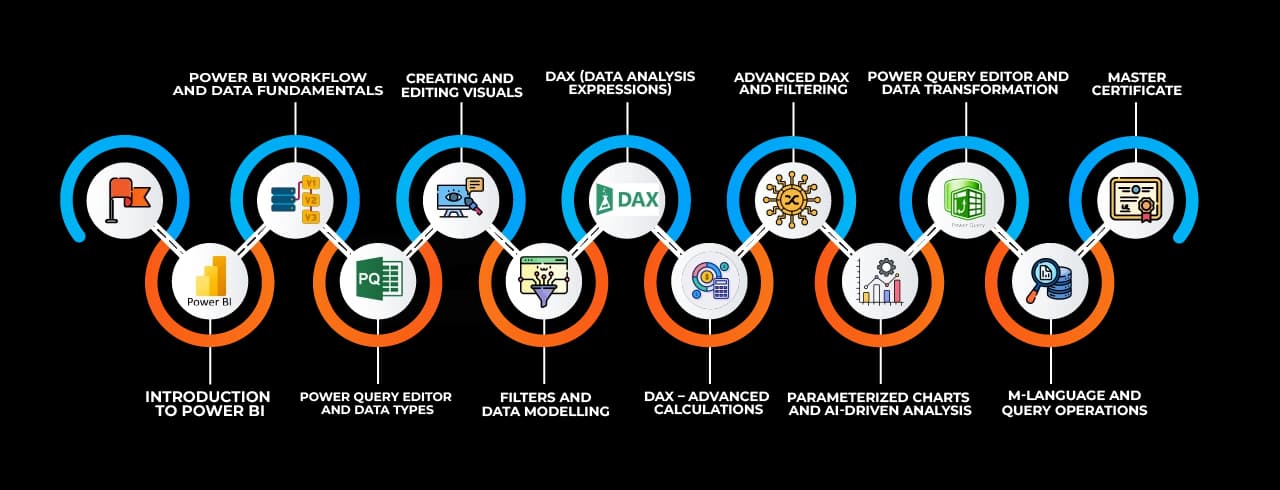
 Data Import/Connection Connecting and importing data from various sources into the BI tool.
 Data Transformation (Power Query)Cleaning, shaping, and preparing data using Power Query.
 Data Modeling (Relationships, Hierarchies)Creating relationships, hierarchies, and defining data structures.
 Data Visualization (D3 Charts, Tables, Maps)Representing data using charts, tables, and interactive maps.
 Dashboards & ReportsDesigning and publishing interactive dashboards and reports.
 Data Analysis Expressions (DAX)Writing formulas and expressions for complex calculations.
 Row Level Security (RLS)Restricting data access based on user roles and permissions.
 Automation & SchedulingAutomating report updates and scheduling data refresh.
 Collaboration & SharingSharing reports, dashboards, and insights with stakeholders.