Tableau Classes in Hadapsar

feature-iconTableau is a visual analytics tool for analysing data and solving problems.
feature-iconUsed by businesses in marketing, sales, and customer satisfaction.
feature-iconTableau is easy to understand and does not require specific training or coding knowledge.

020 48556222

Start Today!

CONSULT WITH
OUR ADVISORS

  • Course & Curriculum Details
  • Flexible Learning Options
  • Affordable Learning
  • Enrollment Process
  • Career Guidance
  • Internship Opportunities
  • General Communication
  • Certification Benefits

Learning Curve for Tableau
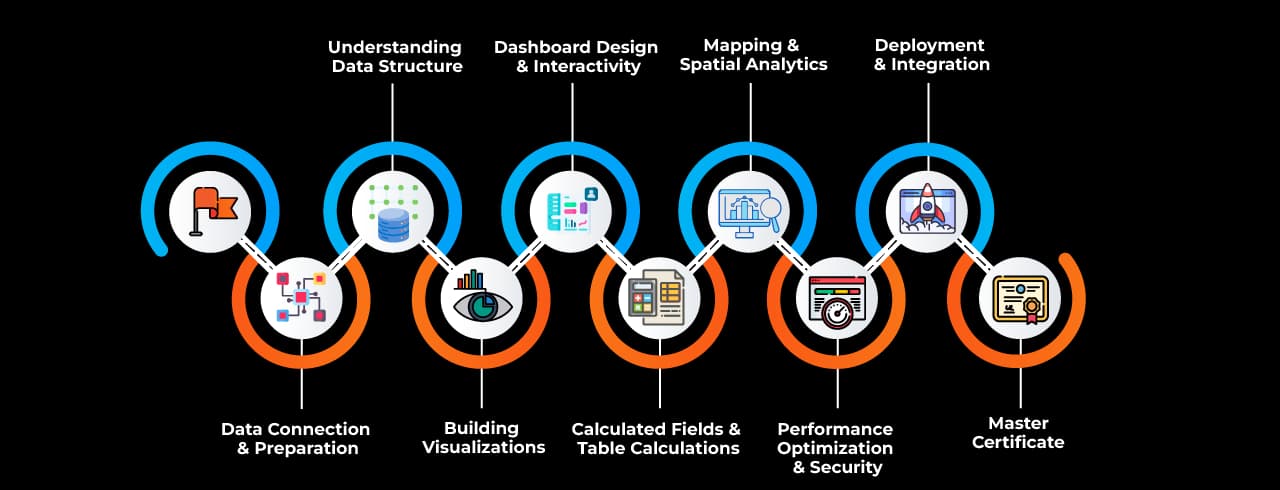
Learning curve for Tableau

Master In Tableau Course

OneCourseMultipleRoles

Empower your career with in-demand data skills and open doors to top-tier opportunities.

Junior Tableau Developer
Tableau Report Developer
Tableau Dashboard Developer
Tableau Data Analyst
Business Intelligence Developer (Tableau)
Tableau Consultant
Tableau Solution Architect
Tableau Specialist
Tableau Trainer

Skills & Tools You'll Learn -

Data Interpreter iconData InterpreterAutomatically detects and cleans messy data for analysis.
Show Me iconShow MeProvides pre-built chart suggestions based on data type.
Data Blending iconData BlendingCombines data from multiple sources without creating a join.
Relationships & Joins iconRelationships & JoinsEstablishes connections between tables for data modeling.
Calculated Fields iconCalculated FieldsCreates custom calculations using formulas.
Table Calculations iconTable CalculationsPerforms computations on data within visualizations.
Level of Detail (LOD) Expressions iconLevel of Detail (LOD) ExpressionsControls aggregation levels for advanced analysis.
Parameters  iconParameters Enables dynamic user inputs for interactive visualizations.
Filters & Quick Filters iconFilters & Quick FiltersRestricts data visibility and allows user-driven filtering.
Sets & Groups iconSets & GroupsCategorizes data for enhanced segmentation and analysis.
Data Extracts & Hyper Engine iconData Extracts & Hyper EngineOptimizes data performance with in-memory extracts.
Dashboard Actions iconDashboard ActionsEnhances interactivity with filters, highlights, and navigation.
Storytelling  iconStorytelling Presents insights through interactive, narrative-driven dashboards.
Mapping & Spatial Analytics iconMapping & Spatial AnalyticsVisualizes geographic data with maps and spatial tools.
Performance Recorder iconPerformance RecorderAnalyzes dashboard performance for optimization.
Tableau Prep iconTableau PrepPrepares, cleans, and shapes data for visualization in Tableau.

Why Choose SevenMentor Tableau

Empowering Careers with Industry-Ready Skills.

Specialized Pocket Friendly Programs as per your requirements

Specialized Pocket Friendly Programs as per your requirements

Live Projects With Hands-on Experience

Live Projects With Hands-on Experience

Corporate Soft-skills & Personality Building Sessions

Corporate Soft-skills & Personality Building Sessions

Digital Online, Classroom, Hybrid Batches

Digital Online, Classroom, Hybrid Batches

Interview Calls Assistance & Mock Sessions

Interview Calls Assistance & Mock Sessions

1:1 Mentorship when required

1:1 Mentorship when required

Industry Experienced Trainers

Industry Experienced Trainers

Class Recordings for Missed Classes

Class Recordings for Missed Classes

1 Year FREE Repeat Option

1 Year FREE Repeat Option

Bonus Resources

Bonus Resources

Curriculum For Tableau

BATCH SCHEDULE

Tableau Course

Find Your Perfect Training Session

Jan 4 - Jan 10

2 sessions
04
Sun
Classroom/ Online
Weekend Batch
10
Sat
Classroom/ Online
Weekend Batch

Jan 11 - Jan 17

1 sessions
12
Mon
Classroom/ Online
Regular Batch

Jan 18 - Jan 24

1 sessions
19
Mon
Classroom/ Online
Regular Batch

Learning Comes Alive Through Hands-On PROJECTS!

Comprehensive Training Programs Designed to Elevate Your Career
Sales Performance Dashboard

Sales Performance Dashboard

Customer Segmentation Analysis

Customer Segmentation Analysis

Healthcare Patient Insights

Healthcare Patient Insights

Financial Risk & Fraud Detection

Financial Risk & Fraud Detection

Supply Chain & Inventory Management

Supply Chain & Inventory Management

No active project selected.

Transform Your Future with Elite Certification

Add Our Training Certificate In Your LinkedIn ProfileLinkedIn

Our industry-relevant certification equips you with essential skills required to succeed in a highly dynamic job market.

Join us and be part of over 50,000 successful certified graduates.

Student 1
Student 2
Student 3
Student 4
Student 5
Join 15,258 others learning today
Certificate Preview

KEY Features that Makes Us Better and Best FIT For You

Expert Trainers

Industry professionals with extensive experience to guide your learning journey.

Comprehensive Curriculum

In-depth courses designed to meet current industry standards and trends.

Hands-on Training

Real-world projects and practical sessions to enhance learning outcomes.

Flexible Schedules

Options for weekday, weekend, and online batches to suit your convenience.

Industry-Recognized Certifications

Globally accepted credentials to boost your career prospects.

State-of-the-Art Infrastructure

Modern facilities and tools for an engaging learning experience.

100% Placement Assistance

Dedicated support to help you secure your dream job.

Affordable Fees

Quality training at competitive prices with flexible payment options.

Lifetime Access to Learning Materials

Revisit course content anytime for continuous learning.

Personalized Attention

Small batch sizes for individualized mentoring and guidance.

Diverse Course Offerings

A wide range of programs in IT, business, design, and more.

Course Content

About Tableau Classes 

In the business world today, it's crucial to make decisions based on data. Companies in many fields depend on insights they get from lots of data to guide their choices. Tableau is a powerful tool for turning data into pictures, making it simple to understand. It helps change raw data into easy-to-see dashboards and visual tales. As businesses keep investing in analyzing data and using it smartly, there's an increasing need for people who are skilled at using Tableau. For aspiring data analysts, business intelligence developers, and professionals seeking upskilling, enrolling in Tableau classes in Hadapsar provides a practical pathway to mastering this crucial skill.

Hadapsar, located in the eastern corridor of Pune, has evolved into a significant hub for IT and business operations. With numerous multinational companies, software parks, and IT training institutes in the vicinity, it offers the ideal ecosystem for skill development. You can find excellent Tableau training right here in this area. This allows people to gain important job skills close to home or work, so there's no need to travel long distances.


Why Learn Tableau?

Tableau is a tool that helps you show data in visual ways. It's very popular with data experts who use it to look at information, make charts, and share insights. Tableau is easy to use, has a strong backend system, and connects with many kinds of data sources, making it a top choice for analyzing data. Whether you need to create dashboards, explore data, or make reports for decision-makers, Tableau is excellent at turning complex data into clear visuals. 

Tableau works with many data sources like SQL databases, spreadsheets, cloud databases, and big data systems. Its drag-and-drop features, calculated fields, filters, maps, and storytelling abilities make it flexible for many professionals. Learning how to use Tableau gives you the skills to turn data into stories that can guide business strategies.


Curriculum Overview of Tableau Courses in Hadapsar

SevenMentor Tableau courses in Hadapsar are structured to provide a comprehensive understanding of data visualization and business intelligence concepts. The course begins with the fundamentals of data analysis and then progresses to more sophisticated methods of presenting data visually. You will learn how to work with Tableau Desktop, such as connecting and blending data. The course also teaches you about important features such as hierarchies, filters, groups, parameters, calculated fields, dashboards, and storyboards. 

In the later part of the course, you'll learn time-series analysis, level-of-detail (LOD) expressions, advanced mapping techniques, and interactivity in dashboards. You'll practice using real-world datasets, which enables you to solve case studies and finish projects, acquiring hands-on skills. The projects simulate actual industry problems, which helps prepare you for actual business scenarios.


Faculty and Infrastructure

One of the major strengths of SevenMentor’s Tableau training in Hadapsar is access to experienced trainers who bring real-world insights into the classroom.These experts have experience in data science, analytics, or business intelligence. They've directly worked with Tableau in big organizations, with practical real-world experience beyond textbooks. Besides experienced instructors, the Tableau Classes in Hadapsar are perfect for technology learning. The labs are equipped with the latest software, high-speed internet, and projectors, which facilitate interactive learning. They enjoy access to e-learning sites, study guides, and video recordings so they are able to learn flexibly as well as at their convenience.


Industry-Relevant Projects and Case Studies

Working on real-world projects is a key part of Tableau Training. Students have the chance to work on case studies that resemble real industry situations. These might include examining retail sales data, preparing financial reports, creating dashboards for supply chains, or analyzing healthcare information. By taking on these projects, students practice handling, modifying, and presenting data clearly. They ensure that everything is functional and visually appealing. Working on projects helps students learn to solve problems with data. By analyzing datasets and building interactive dashboards, they see how data storytelling influences important business decisions. This hands-on experience not only boosts their confidence in technical skills but also prepares them for actual job scenarios.


Certification and Career Opportunities

One of the key advantages of enrolling in Tableau classes in Hadapsar is the preparation it provides for Tableau certification exams such as Tableau Desktop Specialist, Tableau Certified Data Analyst, and Tableau Server Certified Associate. These globally recognized certifications validate a professional’s proficiency and boost their credibility in the job market.

As more businesses rely on data analytics, the demand for people certified in Tableau is increasing in industries like IT, finance, healthcare, e-commerce, telecom, and manufacturing. Positions such as Data Analyst, Business Intelligence Analyst, Dashboard Developer, and Data Visualization Specialist offer great growth opportunities and competitive salaries. Employers appreciate candidates who can do more than just make dashboards. They want professionals who can draw valuable insights from data, offer smart recommendations, and share their findings clearly. People trained in Tableau, particularly in Hadapsar, are well-equipped to meet these needs thanks to their practical and comprehensive training.


About SevenMentor 

When it comes to selecting a reliable and impactful training provider, SevenMentor stands out for its consistent delivery of high-quality education. Known for its experienced faculty, industry-oriented curriculum, and hands-on approach, SevenMentor offers some of the most effective Tableau courses in Hadapsar.

The institute is well-known for its focus on students, helping them gain skills through practical projects, personalized guidance, and career support services. The training at SevenMentor involves preparing for interviews, creating strong resumes, and assisting with job placements. They have extensive connections with recruiters and corporate partners, which greatly boosts the job prospects for their students.

Furthermore, SevenMentor’s ability to adapt to changing technological trends ensures that their curriculum remains relevant. Their commitment to excellence has made them a top choice for individuals and businesses looking for Tableau classes in Hadapsar that deliver real results.

As the need for data visualization becomes more important, learning Tableau is essential for people working in almost every field. Hadapsar is an area with many growing IT companies and a strong educational environment. It offers great opportunities to learn Tableau effectively. By enrolling in Tableau courses in Hadapsar, you can gain practical experience, work with real-world data, and prepare for better job prospects in data analytics. There are many ways to learn. If you want in-person classes, training to improve skills at your company, or flexible online courses, Hadapsar has the right resources to support all these different learning preferences.SevenMentor offers best training for Tableau training in Hadapsar.

Now is the perfect time to invest in your data skills and become a part of the global data revolution. With the right training, tools, and guidance, you can unlock new career possibilities and become an invaluable asset in your organization’s analytics journey.


Online Training 

SevenMentor also offers online Tableau training in Hadapsar. The online learning option is ideal for those who work, study at college, or learn from home, offering flexibility along with quality. These courses match classroom lessons and include live sessions with teachers, virtual labs, project work, and opportunities to ask questions. Online students benefit from tools like virtual whiteboards for writing and sharing ideas, rooms for group discussions, and tests that use simulations to assess knowledge. Sessions are often recorded so students can review them later, which helps when topics are difficult to understand. A support team is always ready to help with technical or academic questions, ensuring online learning is effective and dependable.


Corporate Training 

SevenMentor offers Corporate Tableau training in Hadapsar. These sessions are specifically designed to align with organizational goals, data maturity levels, and team structures. Corporate training ensures that employees are trained using datasets and scenarios relevant to the business, thereby offering immediate applicability. Delivered either on-site or online, the corporate programs emphasize collaboration, use-case driven learning, and performance optimization. Trainers work closely with business stakeholders to customize the content, ensuring that both technical and functional teams benefit from the program. By investing in structured Tableau learning, companies not only enhance their analytical capabilities but also foster a culture of data literacy across teams.

Frequently Asked Questions

Everything you need to know about our revolutionary job platform

1

Is Tableau a technological skill?

Ans:
Although technical Tableau skills are necessary, hiring a professional Tableau developer also requires non-technical and soft skills.
2

Can I use Tableau without having SQL?

Ans:
While SQL is not required to utilize Tableau, it can help you extract, manipulate, and connect to data sources more successfully, particularly when working with large databases.
3

Is coding required with Tableau?

Ans:
No, you do not need to be able to code to utilise Tableau. Tableau is a data visualisation tool with a drag-and-drop user interface.
4

What is the eligibility of the tableau course?

Ans:
There are no specific requirements for learning Tableau, but certain courses may demand a high school diploma or an undergraduate degree.
5

Who should learn about Tableau?

Ans:
Many organisations that rely on data to drive decision-making use Tableau to help them make sense of the data, making it a popular tool across industries and professions. It has a wide range of applications beyond typical data and business analytics.
6

What industries are using Tableau?

Ans:
Data analysts, business analysts, accountants, and financial analysts are among the most prevalent occupations that use Tableau.
7

What is Tableau most commonly used for?

Ans:
Tableau is primarily used to share and analyse information through data visualisation and business intelligence. Tableau offers a range of technologies for data visualisation and sharing, including desktop, public, online, server, and reader.
8

What is the best use for Tableau?

Ans:
Tableau is a widely used data visualisation and business intelligence tool. Tableau is ranked as a leader in analytics and business intelligence by Gartner's Magic Quadrant.
9

OIs Tableau a programming language?

Ans:
No, Tableau is not a coding language. It's a visual analytics tool that allows users to analyse and visualise data.
10

Is tableau superior to power bi?

Ans:
Choosing between Tableau and Power BI depends on your specific needs, but generally, Tableau is considered better for dealing with large datasets and advanced customisation, while Power BI is more user-friendly and integrates seamlessly with other Microsoft products, making it a good choice for beginners and smaller businesses; ultimately, the "better" option depends on your priorities regarding data size, customisation, and integration.
11

Is DAX more advanced than Tableau?

Ans:
For equivalent capability, Tableau makes use of MDX (Multi-dimensional eXpressions). Power BI with DAX, on the other hand, is more powerful and resilient in terms of handling sophisticated calculations and manipulation. Based on the reasons discussed above, we may conclude that the Power BI data model is superior to Tableau.
12

Which tool is more effective, Power BI or Tableau?

Ans:
While Power BI is a more powerful and cost-effective solution, Tableau is easier to use and has more visualisation possibilities.
13

Can Tableau handle DAX?

Ans:
Tableau does not have a singular counterpart to DAX. There is a calculating language that is extremely close to Excel formulas but not exactly the same. PBI handles that type of thing significantly differently from Tableau.
14

Is Tableau a talent that can be added to your resume?

Ans:
Create a skills section. Employers may prioritise hard skills, which as a tableau developer include fluency with data visualisation tools, data analytics, and Tableau software.
15

Is Tableau and SQL sufficient to get a job?

Ans:
Some positions require only SQL, Tableau, Power BI, Excel, Python, or R, or a combination of these.

Explore Other Demanding Courses

No courses available for the selected domain.